
Google model · 4 to 10 s · Sound built in
Gemini Omni Video Generator: Turn a Photo into a Clip with Sound
Run Google's Gemini Omni, its newest video model, on your own photo without a Google AI plan. Pick 4, 6, 8 or 10 seconds at 720p, 1080p or 4K, and every clip comes back with sound generated alongside the picture.
Sign in to use these settings, with 30 free credits · Gemini Omni · 720p · 4s
 Still
Gemini Omni55 credits
 Still
Gemini Omni55 credits
 Still
Gemini Omni55 credits
 Gemini Omni
Omni on ImageVideoAI: Settings at a Glance
Omni is Google's newest family of video models. Google rolled out its first one, Gemini Omni Flash, on May 19, 2026, to the Gemini app, Google Flow and YouTube Shorts, and its developer documentation now recommends Omni Flash as the default video model. Here it forms a Gemini family of its own, and this page's generator only offers that model.
| Setting | Omni on this site |
|---|---|
| Input | One photo, used as the start of the clip |
| Clip length | 4, 6, 8 or 10 seconds |
| Resolution | 720p, 1080p or 4K |
| Sound | Always on, generated with the video |
| Frame shape | 16:9 for landscape photos, 9:16 for portrait photos, chosen automatically |
| Starting setting | 720p, 4 seconds, for 41 credits |
The frame follows the shape of your photo, so a tall phone picture becomes a vertical clip ready for Shorts or Reels, and a wide one becomes widescreen. Square photos are framed as one of the two, so crop first if the edges matter.
What Omni Does Well Here
- Sound with every take. Ambience, footsteps and voices arrive in the same render, so there is no separate audio step and no switch to forget.
- Same price at 720p and 1080p. Full HD costs nothing extra, which makes 1080p the sensible pick for anything you plan to keep.
- A 4K option. The top tier renders 4K for final files and large screens.
- Short, fixed lengths. Four stops from 4 to 10 seconds keep the cost predictable for single shots.
What Isn't Included
Google's own apps add tools that stay there: conversational edits of a finished clip in the Gemini app, Flow's scene tools, and free generation inside YouTube Shorts. On ImageVideoAI, the model only animates a photo. There is no text-only mode, no end frame and no sound switch. ImageVideoAI is an independent site and is not affiliated with Google.
Credits Per Omni Clip
Every clip has a fixed price shown before you confirm, and a failed render puts the full amount back on your balance.
| Length | 720p or 1080p | 4K |
|---|---|---|
| 4 s | 41 | 96 |
| 6 s | 55 | 110 |
| 8 s | 69 | 123 |
| 10 s | 82 | 137 |
On the Starter plan, 500 credits at $9.99, a 4-second clip at 1080p works out to about $0.82, and 10 seconds to about $1.64. For comparison here, an 8-second 720p Veo 3.1 Lite clip is 65 credits and a 5-second 720p MiniMax H3 clip is 30, both with sound. Monthly, yearly and one-off options are compared under plans and credits.
A free account starts with 30 credits valid for 30 days, then 5 a day that don't stack, so the cheapest Omni clip at 41 credits needs a small top-up or a few days of saving. Free renders are watermarked and capped at 720p. Visitors who skip sign-up still get a daily free clip, though that one comes from Seedance 1.0 Pro Fast rather than Omni.
How this compares with Google's own apps
In Google Flow, Omni Flash at 720p costs 7, 10, 12 or 15 Flow credits for 4, 6, 8 or 10 seconds, and video in the Gemini app needs a paid Google AI plan, as of October 2026. Here you pay per clip in our credits without a Google subscription, and you can try the same photo on Kling, Veo or Seedance from the same balance.
How to Make a Gemini Omni Video from a Photo
- Upload one photo. JPG, PNG or WebP under 10 MB. Its shape decides whether the clip is 16:9 or 9:16.
- Describe the motion and the sound. Name the moving parts, the camera's path and the sounds you expect, since audio comes with every take.
- Pick length and resolution. 4 to 10 seconds; 720p and 1080p cost the same, 4K costs more.
- Generate and download. The credit figure updates with every change before you press the button.
To compare the same photo across every model family, upload it on the image to video AI homepage instead.
Writing Prompts for Omni
- Write the sound in. Name the ambience and any voices: "rain on the window, a kettle starting to whistle".
- One action for 4 seconds, two for 10. Short stops leave room for one clear movement; plan the longer ones as a short sequence.
- Anchor the subject. "The man in the green jacket" holds the motion better than "he".
- Draft at 720p, keep at 1080p. They cost the same, so render the keeper in full HD and save 4K for the final cut.
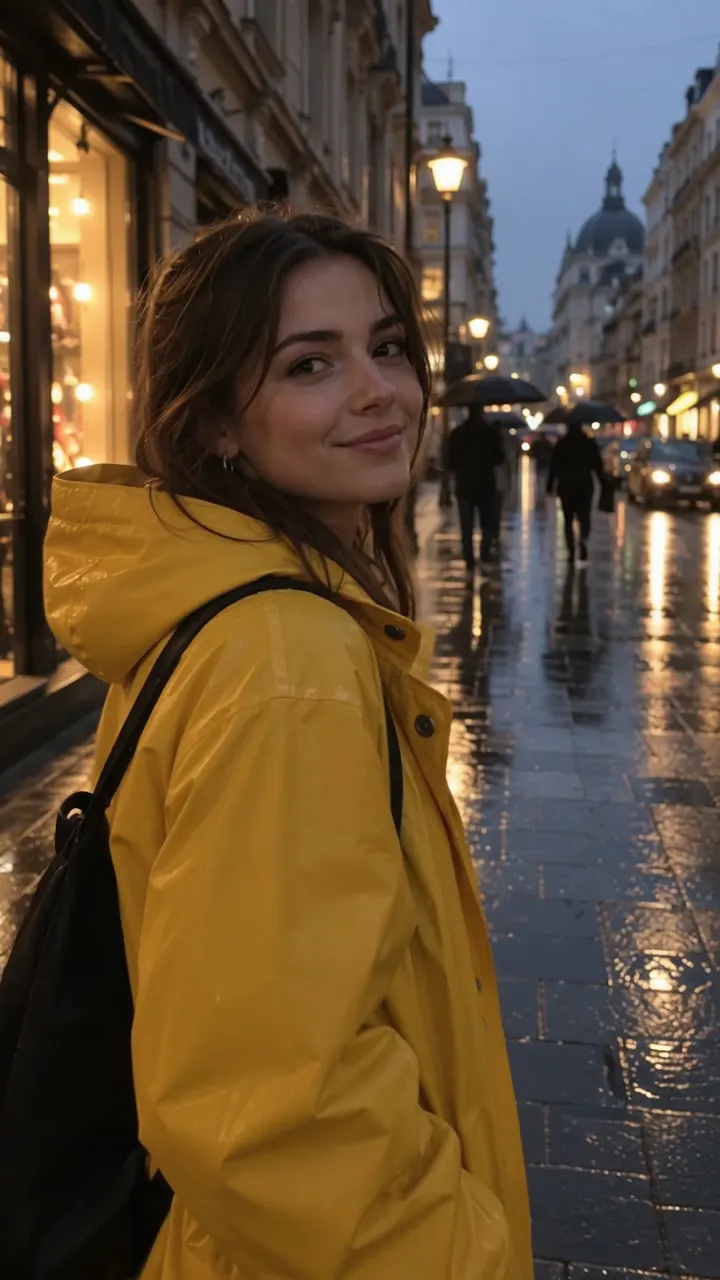
The woman in the yellow raincoat looks up as rain begins, smiles and opens her umbrella, the camera slowly pushing in; rain patters on the fabric and traffic hums behind her.
A golden retriever on a wooden porch lifts its head, wags its tail and barks once at the camera; birdsong and a screen door creaking in the background.
A chef in a small kitchen flips vegetables in a pan, flames rising for a moment; sizzling oil, a radio playing quietly.
Omni vs Veo 3.1 vs Kling 3.0
All three animate a photo with sound, and they come from two companies: Google makes Omni and Veo, Kuaishou makes Kling.
| Omni | Veo 3.1 Lite | Kling 3.0 | |
|---|---|---|---|
| Lengths | 4 / 6 / 8 / 10 s | 4 / 6 / 8 s | 3–15 s |
| Top resolution | 4K | 1080p | 4K |
| Sound | Always on | Always on | Optional |
| End frame | No | Yes | Yes |
| A 720p clip | 41 credits, 4 s | 65 credits, 8 s | 42 credits, 5 s, silent |
Veo 3.1 is the other Google family on the site and adds a first-and-last-frame option; compare its tiers on the page for the Veo 3.1 AI video generator. Kling runs longer and lets you switch sound off for cheaper drafts; see the Kling AI video generator guide for every version.
FAQ
What is Gemini Omni?
It is Google's newest family of AI video models. Its first model, Gemini Omni Flash, launched on May 19, 2026 in the Gemini app, Google Flow and YouTube Shorts, and Google's developer documentation recommends it as the default for video generation. Here it turns one photo into a 4 to 10 second clip with sound.
Is Gemini Omni free to use here?
Not quite. It needs a free account, and the cheapest clip costs 41 credits, more than the 30 sign-up credits, so it takes a few days of the 5 daily credits or a credit pack. Free renders are watermarked and stop at 720p. Guests' one free daily video runs on a different model.
Is this the Flash version?
Our provider lists the model without naming a variant, so we can't confirm which version runs here. The first Omni model Google released is the Flash version. ImageVideoAI isn't affiliated with Google; the model runs through an outside provider.
Does Gemini Omni video have sound?
Yes, every clip. Sound is generated together with the picture and can't be switched off, so describe the ambience, effects or voices you want in the prompt. If you need a silent clip, Kling 3.0 or Seedance 1.0 Pro Fast on the same balance can render without audio.
Can Gemini Omni make a video from text only?
Not on this site. Here it only animates a photo you upload. For a clip from words alone, switch the generator to text mode and pick another family; our text to video AI page explains which ones accept prompts only.
Is it a good Gemini video generator for vertical clips?
Yes. Upload a portrait photo and the clip comes out 9:16, ready for Shorts, Reels or TikTok, with sound already in it. A landscape photo produces 16:9. Square photos are fitted to one of the two shapes, so crop them first if you want control over the edges.
Compare other models
Image to Video AI
Turn any photo into a short AI video. Upload an image, describe the motion and pick a model, from Kling and Veo to Grok Imagine and Vidu. Start free with 30 credits.
AI Video Generator
An AI video generator with Kling, Veo, Seedance, Hailuo, Wan, Grok Imagine, Vidu and PixVerse. Create videos from text or images and pay only for what you use.
Google Veo 3.1 AI Video Generator
Generate videos with Google Veo 3.1 from text or a photo. Pick Quality, Fast or Lite, set first and last frames, and try Veo image to video online today.
Kling AI Video Generator
Kling AI image to video online: turn a photo into a clip with Kling 4.0, 3.0, 2.6 or 2.5 Turbo. Compare versions and credits per clip, then try it in your browser.
Animate a Photo With Omni
Upload a photo, describe the motion and the sound, and pick 4 to 10 seconds. The credit price is on the button before you start.