
Two photos · One theme · 10 s vertical rap
Hotel Lobby AI Video Generator: Turn Two Photos into a Rap Duet
Upload one photo for the left performer and one for the right, type a one-line theme, and the AI puts the two of you side by side in an orange, hotel-lobby style recording booth. You take turns rapping original lyrics over a beat, with lip sync, under a single hanging microphone: a ten-second vertical clip made for Reels, TikTok and Shorts.
Two photos, left and right · an original rap with beat and lip sync · 10s · 480p · 9:16
Only use photos of people who agreed to rap on video, or of your own pets.
Sign in to use these settings, with 30 free credits · Wan 3.0 · 480p · 10s · sound
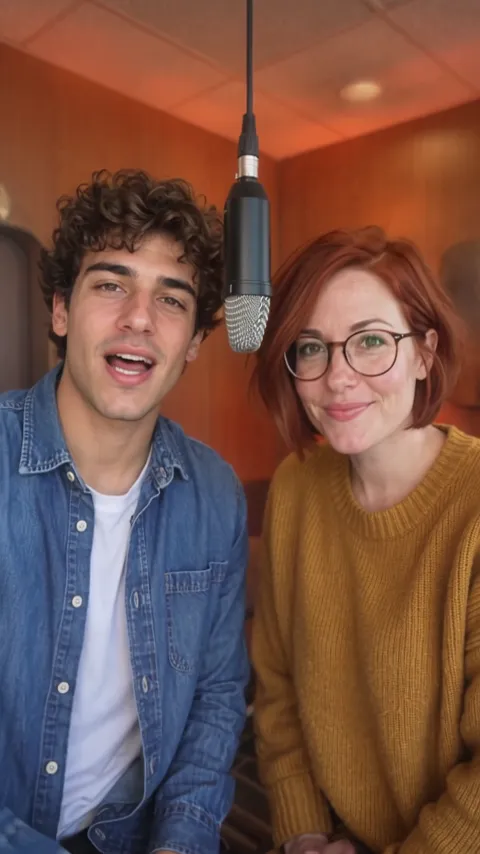 Still
Wan 3.059 credits
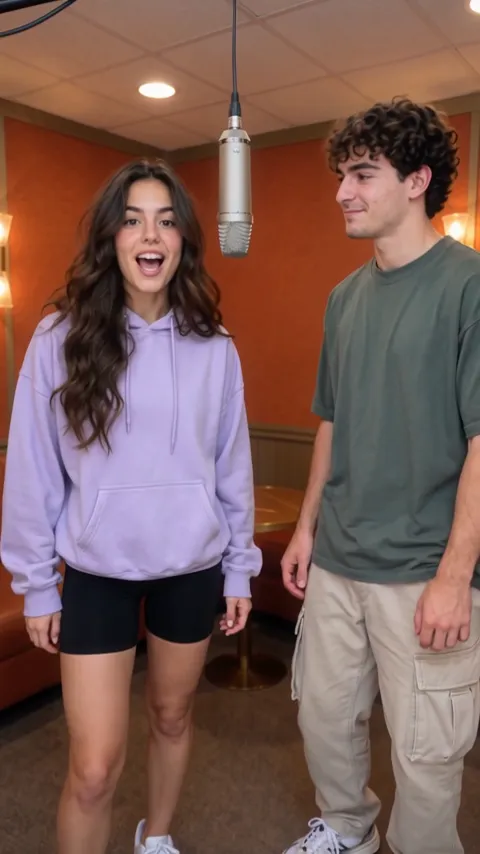 Still
Wan 3.059 credits
 Still
Wan 3.059 credits
 Wan 3.0
How to make a hotel lobby rap video
Upload the left and the right performer
Pick one clear photo per performer: a friend, a partner, a sibling or a pet. One face per photo, looking roughly at the camera, not covered by hands, hats or sunglasses. The first photo always raps on the left and the second on the right, so put them in the order you want to see them.
Write the theme in one line
The theme is what the lyrics are about: a trip you took together, a running joke, a birthday, your dog's love of snacks. Keep it short; the AI writes the verses, the beat and who raps when. Leave it empty and the two of you hype each other up.
Generate and share
Every clip is made with Wan 3.0 at 480p, ten seconds long, in 9:16 with sound: 59 credits. The button shows the price before you start, and a failed render refunds it. Download it and post it as it is; the vertical frame already fits short-video apps.
What the hotel lobby rap asks the model for
The built-in instructions describe the trend's look and the details that usually break in two-person rap clips.
| What we ask for | Why it matters |
|---|---|
| A small booth with warm orange walls and light, one hanging microphone, a clean background | The recognisable hotel lobby look, without clutter pulling focus from the two of you |
| The two take turns: one raps, the other nods along, then they switch | Reads as a duet with verses traded back and forth, not two people talking over each other |
| Lip sync, each mouth moving only on its own lines | The rap looks performed, not dubbed |
| Same faces, hair and outfits; left stays left, right stays right | You both still look like yourselves, in the order you uploaded |
| Exactly two performers, faces sharp and lit, no captions | No extra people, no blurred faces, nothing covering the video |
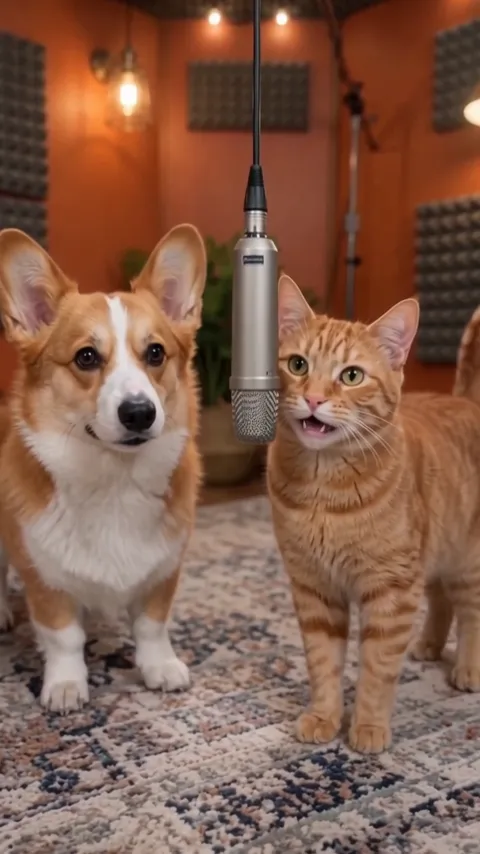
We tested it on three pairs before launch: two friends (theme: Monday mornings at the office), a couple (how we met at a coffee shop) and a corgi with a cat (who gets the last treat). All three kept the faces, outfits and left / right order, put both under one hanging mic in an orange booth, and came back with English lyrics on the theme, the turn passing halfway through or every couple of lines. One take repeated a line, so it is worth generating again when a verse falls flat. Lyrics, beat and voices are made with the video, so every take is new. For two people who should dance instead of rap, use a single photo of both in the AI couple dance video generator.
Where a hotel lobby rap fits
- Best-friend posts. Turn an inside joke into a ten-second rap battle you can tag each other in.
- Couples. Rap about how you met, your anniversary or who always steals the blanket.
- Pet duos. Put your dog and cat, or you and your pet, in the booth and let them trade bars.
- Birthdays and shout-outs. Send a friend a rap about their big day, starring the two of you.
- Trend posts. Join the hotel lobby rap trend on TikTok, Reels or Shorts without filming anything.
Prefer a softer moment for two? The AI hug video turns one photo of two people into a warm hug.
Price, sign-up and fair use
Each hotel lobby rap costs 59 credits. It needs an account: signing up is free, hands you 30 credits for the first month and drips in 5 more daily, so a first clip takes a few days of daily credits, or buy a plan or credit pack to make one right away and get clean files without our mark.
Only use photos of people who agreed to be turned into a rap video, or of your own pets. Leave celebrities and strangers out, and don't make lyrics that mock, insult or harass a real person.
Hotel lobby AI video FAQ
Which photos work best?
One sharp photo per performer, a single face in each, well lit and looking roughly at the camera. Waist-up shots show the most face, but full-body photos work too: in our tests the clip kept roughly the framing of the photos, so two full-body photos give a full-body booth. Group photos, tiny faces and heavy filters make identities drift.
Can I control who raps first?
The first photo is the left performer and the second the right, and the left one usually opens. The model decides the exact split of lines, so a take may not be perfectly even; generate again for another version, and remember each run is charged.
Who writes the lyrics and the beat?
The model writes original lyrics from your theme and generates the beat and both voices together with the video. You don't upload music or a script. In our tests every English theme came back as English lyrics on that topic, such as "Monday morning, clock is ringing" for a Monday-morning theme. The verses follow the idea, not your exact words, and a line can repeat. We haven't tested themes written in other languages yet.
Does it work with pets or cartoon characters?
Pets work: in our corgi-and-cat test both kept their fur and markings and moved their mouths on their own lines. A drawing or cartoon character can work as well, though the model may make it look more realistic. Use characters you own or made yourself.
More ways to animate a photo
Rap Duo AI
Upload a photo of two people or a person and a pet, type a rap theme, and get a short rap duet: original lyrics, a beat and lip sync, 5, 10 or 15 seconds.
AI Fight Generator
Upload one or two character photos, pick boxing, kung fu, wrestling or anime and get a 10-second fictional fight video with clear moves, sound and no gore.
Animate Photos with AI and Make Pictures Move
Animate a photo with AI: add natural motion, blinking, hair and camera movement to any picture, then download a short video. Free credits to try.
Image to Video AI
Turn any photo into a short AI video. Upload an image, describe the motion and pick a model, from Kling and Veo to Grok Imagine and Vidu. Start free with 30 credits.
Two photos, one booth, your rap
Pick the left and the right performer, give them a theme, and watch them trade verses.