
Idol-style routine · 5 s · Sound on
K-Pop Dance AI: Turn One Photo into an Idol-Style Dance Video
Upload one full-body photo and become the centre of a K-pop dance: crisp arm lines, quick footwork, a hair flip and a confident final pose to the camera, all on the beat and with sound. No practice room hours needed.
Only use photos of yourself or of people who agreed to dance on video.
Free video, one a day without an account · Seedance 1.0 Pro Fast · 480p · 5s
1 left today
 Still
StillMiniMax H315 credits
 Still
StillMiniMax H315 credits
 MiniMax H3
How to make a K-pop dance video
Start with a full-body photo
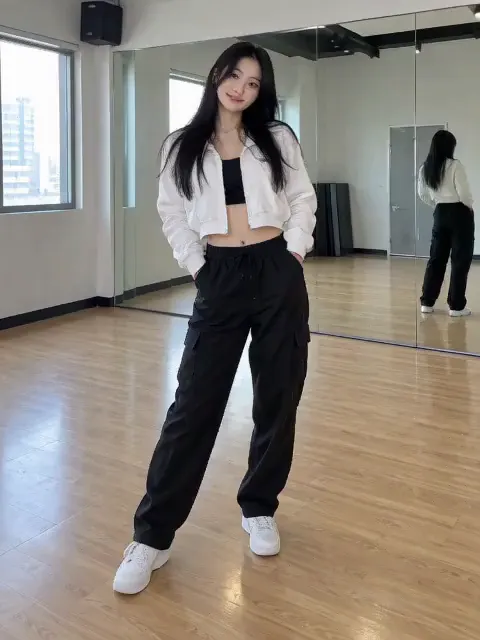
Idol choreography is all about lines and footwork, so the model needs to see you from head to sneakers. Stand straight, arms relaxed at your sides, with some space around you. A mirror-wall practice room, a street or a plain wall all work; a crowded background makes the limbs harder to track.
Let the routine play, set the stage
The idol-style routine is written into the effect. Your details only change the setting and the finish: a concert stage under pink lights, a practice room, a neon city at night, a wink at the end. Typing the name of a specific song or group won't recreate its choreography.
Generate the clip
Out of the box, MiniMax H3 performs it: a five-second take at 480p costing 15 credits, with its own beat recorded into the file. The button shows the exact credits before you start, and a failed render refunds them. Pick another model from the menu when you want a sharper file.
What the K-pop dance looks like
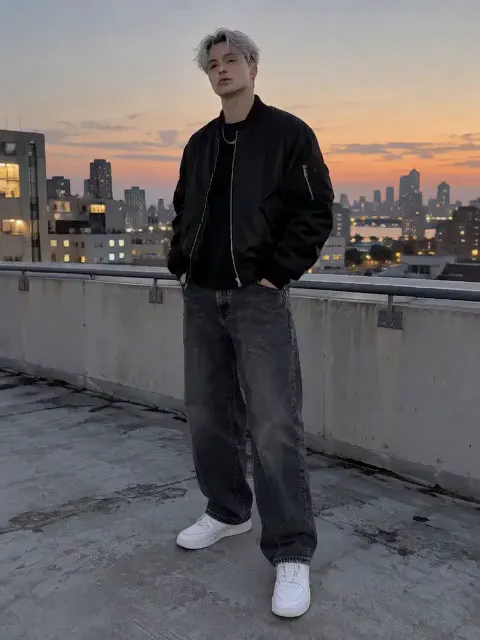
We ran a woman in a cropped white jacket in a practice room and a silver-haired man on a rooftop at dusk through the effect before release. Both hit sharp arm movements, stepped side to side on the beat and finished with a pose, and the hair flip landed on the long hair. Faces and outfits stayed as they were in the photos.
| Photo | What you get |
|---|---|
| Full body, standing, plain background | The full routine with clean footwork |
| Knees up | Arm work and hair flip, less footwork |
| Seated or a headshot | Little dancing; use the face dance effect instead |
| Two or more people | Unpredictable; the routine is written for a solo |
This is an idol-inspired routine, not a copy of one group's choreography. If you want a particular trend move for move, the dance song pages copy real reference clips, such as the King Nasir dance.
Ideas for your K-pop dance video
- Fan edits. Put yourself on stage next to your favourite group's comeback, then add the song in your edit.
- Dance challenge teasers. Post the AI version first and the real attempt after.
- Profile intros. A five-second clip is a fun way to open a TikTok or Reels profile.
- Your OC or avatar. A drawn character standing upright can dance too and keeps its art style.
- Group chat dance-offs. Each friend uploads a photo and the chat votes for the best stage presence.
Only the face in frame? The face dance effect keeps the shot close and moves the head to the beat instead.
Price, free tries and fair use
Rehearsal is free once a day: without logging in you get one daily clip from the starter model, mute and stamped with our mark. Signing up hands you 30 credits for the first month, which is two full K-pop dances, and drips in 5 more credits daily. Buy a plan or credit pack for clean files you can use in sponsored or brand posts.
Make dances of yourself or friends who are in on it. Leave real idols and other celebrities out unless they have given permission, and never make suggestive dances of anyone.
K-pop dance FAQ
Can AI do a specific K-pop song's choreography?
Not on this page. The effect performs a general idol-style routine with sharp lines, footwork and a hair flip. It doesn't copy the moves of a particular song, and typing a song title won't change that.
Does the video include K-pop music?
It includes sound made by the model, not a real K-pop track. To use an actual song, add it in TikTok, Instagram or YouTube, where the music is licensed.
Will I still look like me?
The effect tells the model to keep your face and outfit unchanged, and both test dancers kept theirs through the routine. Fast moves can still blur a frame or two; if a run doesn't look right, generate again, and remember each run is charged.
Can I make the clip longer or sharper?
Yes, by picking another model in the menu: some go to 1080p or beyond and run longer than five seconds. The price updates on the button before you generate.
More ways to animate a photo
Face Dance AI
Turn a selfie into a face dance: head bobs, eyebrow raises, a wink and a big smile on the beat, with sound. One photo, 5 seconds, made for memes. Try it free.
King Nasir Dance AI
Make anyone do the King Nasir dance with AI. Upload one full-body photo and get a 10-second clip with the trend's moves and original audio, ready for TikTok.
Animate Photos with AI and Make Pictures Move
Animate a photo with AI: add natural motion, blinking, hair and camera movement to any picture, then download a short video. Free credits to try.
Image to Video AI
Turn any photo into a short AI video. Upload an image, describe the motion and pick a model, from Kling and Veo to Grok Imagine and Vidu. Start free with 30 credits.
Your debut stage is one photo away
Pick a full-body photo, choose a stage or leave it plain, and take your spot in the centre.