
Halloween 2026 · TikTok, Reels, Shorts
AI Ghost Prank Video: The Ghost Behind Me Filter, Animated
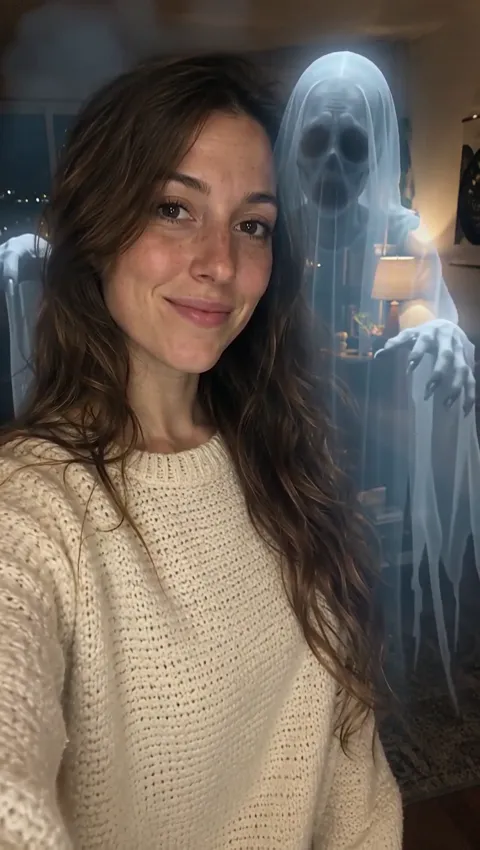
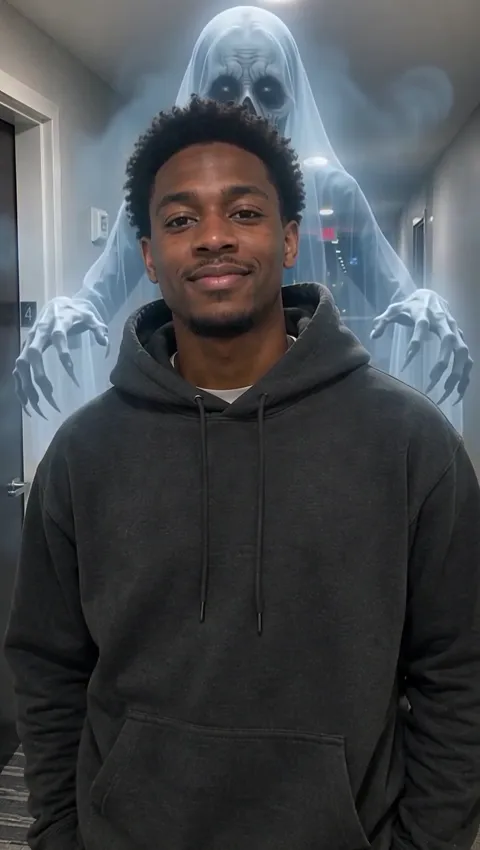
Upload one photo of a smiling person and the AI ghost prank does the rest: a tall, pale ghost drifts out of the mist behind them while they keep grinning at the camera. The clip comes with an eerie whoosh.
Only upload photos of people who agreed to be in the clip. No celebrities.
Free video, one a day without an account · Seedance 1.0 Pro Fast · 480p · 5s
1 left today
 Still
StillWan 3.030 credits
 Still
StillWan 3.030 credits
 Wan 3.0
How the Ghost Prank Works
The joke lives in the gap between the person and what is behind them. Your friend looks relaxed and happy; the viewer sees a figure rising over their shoulder. You supply the picture, and the preset takes care of the ghost, the fog, the timing and the sound.
Pick a photo with room behind the person
Choose a shot of one person with the face clearly visible, looking toward the lens. Leave some background above and around the shoulders, because that is where the ghost appears. A tight face crop gives it nowhere to go. A dim room, a hallway or a backyard at dusk sets a spookier stage than a sunny beach.
Generate as is, or add a small touch
The ghost, its long arms and the mist are already written into the preset, so you can generate straight away. The details line is optional (up to 500 characters) and never replaces the ghost. It works best for small touches: a colder blue tint, a slower reveal, a wider smile. Props or a new room that aren't in your photo may not show up, so let the picture set the scene.
Check the price on the button
By default the prank is rendered by Wan 3.0, 480p and five seconds long, sound effects included, for about 30 credits. Switching to a different engine in the dropdown keeps the ghost in the prompt, and the button shows the new number before you commit. If a generation fails, the credits are returned.
Watch it, then show the person in it
Save the clip and send it to whoever is in the photo before anyone else sees it. Free downloads carry a watermark. Paying with a plan or credit pack strips it and unlocks higher resolutions on models that offer them.
Where a Ghost Prank Video Lands Best
The ghost behind me filter spread on TikTok because the setup is tiny: one calm face, plus something the audience can see and the subject can't. Here is how people put it to work in the week before Halloween.
- Friends who are in on it. Make a clip of your roommate, show it to them, then post their reaction next to the original.
- Your own selfie. Turn an ordinary selfie into a haunted one and caption it with something deadpan, like "felt a draft".
- Party teasers. Take a photo of the host in the hallway where the party will happen and post the clip a few days before October 31.
- Still first, clip second. Post the plain photo as the first slide of a carousel and the clip as the second, so the ghost arrives as a surprise.
- Small Halloween events. A volunteer in the haunted-house corridor, with their consent, makes a quick promo for the night.
A ghost is the quiet option. For something louder, an AI demon rises from a golden magic circle behind the person. Or skip the visitor altogether and turn the person into the monster with the AI zombie video effect. All three are compared on our AI Halloween video page.
Ghost Filter Tips for a Creepier Clip
A still ghost filter pastes a shape into a picture and stops there. This one moves: the figure fades in, grows taller and reaches over the person's shoulders across five seconds, while the person stays perfectly at ease. Some parts are yours to change, and some are fixed.
| What | Where it is set | Tip |
|---|---|---|
| The setting | Your photo | A staircase, a dark doorway or a long hallway sets the scene before the ghost arrives |
| Small touches | Details field | A colder tint, a slower reveal, a wider smile; new props may not appear |
| The person's reaction | Fixed in the preset | They keep smiling, unaware; that contrast is the joke |
| The ghost | Fixed in the preset | Tall, pale, see-through, with long swinging arms |
| Length and sharpness | Model menu | Another model or setting changes the clip and the price |
A few habits help the prank read clearly on a small screen:
- Keep the whole face visible: no sunglasses, masks or hair over the eyes.
- Frame the person in the middle or lower half of the picture, so there is open space above the shoulders.
- Stick to one person per photo. The preset is written for a single subject.
- Posting to TikTok, Reels or Shorts? Upload a portrait-orientation photo.
- Write the caption before you post. The prank works best when the text plays it completely straight.
For a different kind of haunting, written entirely by you, use the image to video AI tool with your own prompt. Wan 3.0 is the default model here, and the Wan AI video generator page covers what it can do at other lengths and resolutions.
Prank Friends, Not Strangers
A good prank ends with everyone laughing, including the person in the picture. Keep it that way:
- Ask before you upload. Use photos of yourself or of friends who said yes. For anyone under 18, a parent or guardian has to agree.
- Leave famous people out. No celebrities, influencers or other public figures.
- Don't fake a real haunting. Don't use a clip to convince someone that their home is haunted, to frighten people who scare easily, or to single anyone out.
- Say it's AI. When you post publicly, mention that the ghost was made with AI, or switch on the platform's AI label.
Your photo and the finished clip stay out of AI training. The video model provider receives them for one purpose: generating your clip.
Ghost Prank FAQ
Is the AI ghost prank free to try?
Yes, but guests are capped at one per day. That free video needs no sign-up and is made by the lightweight Seedance 1.0 Pro Fast model in 480p: 5 seconds, watermarked, and silent, so the whoosh is missing. Registering brings a one-off grant of 30 credits to spend within 30 days, roughly the price of one haunted clip with sound on the default model, plus 5 credits each day.
What is the ghost behind me filter?
It is a TikTok trend where someone smiles at the camera while a ghostly figure appears behind them. Here you make it from one photo instead of filming: the person stays calm and unaware, a pale ghost rises from the mist over their shoulders, and an eerie whoosh plays underneath. The result is a short video you can post anywhere.
Is this a photo filter or a video?
A video. You upload a still picture, and the result is a 5-second moving clip in which the ghost fades in and reaches toward the person. If you want a spooky still for a profile picture, take a screenshot of your favorite frame. Free clips come with a watermark that a plan or credit pack removes.
Does the ghost prank video have sound?
Yes, on the default model. The eerie whoosh is part of the effect, generated by Wan 3.0 along with the picture. The free guest video runs on Seedance 1.0 Pro Fast, which makes silent clips, and some other models in the menu are silent too. You can always add your own music inside TikTok, Instagram or YouTube.
Can I put a ghost behind a group photo?
The preset is written for one person, so a single portrait with the face clearly visible gives the most reliable result. With several people in the frame, the model has to guess who the ghost is reaching for. Crop the photo down to one person, or make a separate clip for each friend and post them as a series.
How many credits does a ghost clip use?
About 30 credits by default, for a five-second Wan 3.0 clip at 480p that includes the sound. Another model changes the price; for example, a quick silent test on Seedance 1.0 Pro Fast costs 6. The exact number appears on the button before you generate, and failed clips refund their credits. Monthly plans and one-time packs sit side by side on the pricing page.
More ways to animate a photo
Image to Video AI
Turn any photo into a short AI video. Upload an image, describe the motion and pick Kling, Veo, Hailuo, Seedance or Wan. Start free with 30 credits.
Animate Photos with AI and Make Pictures Move
Animate a photo with AI: add natural motion, blinking, hair and camera movement to any picture, then download a short video. Free credits to try.
AI Halloween Video Maker
Make an AI Halloween video from one photo: a ghost behind you, a summoned demon, or your own zombie transformation, with sound. Try one free each day.
AI Zombie Video Maker
Make an AI zombie video from one photo: skin turns ashen, eyes go milky, then a growl and a lurch at the camera. Creepy, not gory. Try it free online.
Who Is Standing Behind You?
Pick a photo with some dark space over the shoulders and make an AI ghost prank before October 31.