
Halloween 2026 · 8-second clips with sound
AI Demon Summoning: A Winged Demon Rises Behind You
This AI demon effect lights a golden magic circle at your feet and raises a horned, winged figure out of the smoke behind you. One photo is all it needs, and the 8-second clip arrives with its own sound.
Use only photos of people who said yes to this effect. No celebrities.
Free video, one a day without an account · Seedance 1.0 Pro Fast · 480p · 5s
1 left today
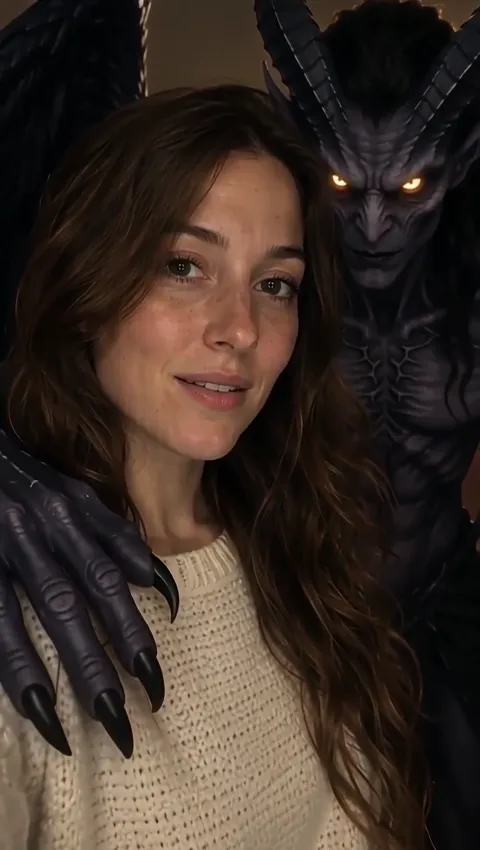 Still
StillWan 3.047 credits
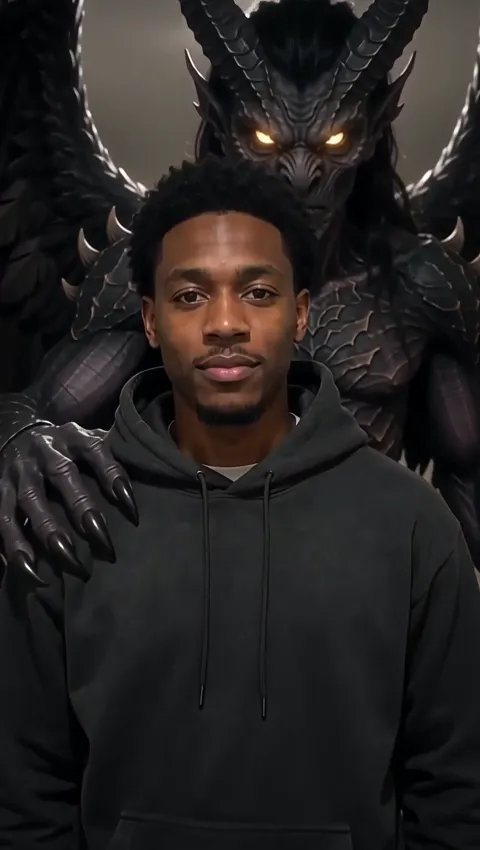 Still
StillWan 3.047 credits
 Wan 3.0
How to Summon a Demon from One Photo
The scene plays out like a ritual in miniature. First the circle ignites on the floor, then golden smoke gathers, then the demon takes shape behind the person and rests a clawed hand on their shoulder. As the camera pushes in, their calm expression turns into a knowing smile, as if they had planned the whole thing.
Upload a portrait of one person
Pick a picture where one person is clearly in view and the face is sharp and unobstructed. Standing shots with some floor visible give the magic circle a place to appear, and open space behind the person leaves room for the wings. Group shots and heavy filters make the result less predictable.
Leave the ritual to the preset
The circle, the smoke, the demon and the push-in are already described for the model, so the details field is optional. If you use it, stick to small changes: a slower reveal, a wider smile at the end, a redder glow. New props or a different room may not appear. The field takes up to 500 characters, but a short phrase is enough.
Check the credits
The default run is Wan 3.0 at 480p for 8 seconds with sound, which costs about 47 credits because this effect is longer than most. The button shows the precise figure, and a different model from the menu changes it. Credits from a failed run are put back automatically.
Download and post
Free clips are watermarked. Plans and credit packs give clean files, higher resolutions where a model supports them, and commercial use.
Ways to Use an AI Demon Clip This Halloween
The effect works because of the twist at the end: the person isn't scared, they look like they called the demon on purpose. That small smirk is what people share.
- The villain reveal. Post a normal portrait, then the clip, with a caption about finally showing your true self.
- Costume night. Take a photo in your Halloween outfit, ideally something dark or dramatic, and let the demon join the look.
- Game nights and fantasy groups. A summoning scene fits a tabletop campaign, a fantasy book club or a gaming stream intro, as long as everyone in the photo agreed.
- Profile videos for October. Short looping clips work well as a seasonal intro on social profiles.
- A message to friends. Send it the night before October 31 with an invitation to your party.
Every Halloween effect we offer is compared on the AI Halloween video hub. Prefer something subtler? Our AI ghost prank keeps the person smiling while a pale ghost drifts in behind them. For a full transformation instead of a visitor, an AI zombie video turns the person into the monster.
More Than a Demon Filter: Tips for a Stronger Scene
A demon filter on a camera app usually adds horns or red eyes to a face. Here, nothing about the person's face changes except the expression. The demon is a separate figure that appears behind them, and the camera moves. Here's what affects the result:
| Element | Who controls it | What to keep in mind |
|---|---|---|
| Magic circle and golden smoke | The preset | Always appears at the person's feet |
| The demon | The preset | Horned and winged, with a clawed hand on the shoulder |
| The smile | The preset | Calm at first, then a knowing smile as the camera pushes in |
| Timing, smile and light | Your details | A slower reveal, a wider smile, a redder glow; new props may not appear |
| Model, resolution, length | The menu | Changes the look and the price |
A few practical tips:
- Choose a picture where the face is lit well enough to read the expression change.
- Leave space above and behind the head; tightly cropped selfies leave the wings nowhere to go.
- Dark clothes and a dim background match the golden light of the circle.
- Use one subject only. The demon reaches for one shoulder, not a crowd.
- Plan your caption around the smile at the end, since that is the moment viewers replay.
Want to write your own summoning, with different creatures or lighting? Upload the same picture to our image to video AI generator and describe the scene yourself. Curious about the engine behind the summoning? Read the Wan AI video generator overview. Whichever route you take, the cost is shown before the ritual begins.
Keep the Darkness Playful
A demon standing behind someone is fiction, but the face in it belongs to a real person. Before you upload:
- Get a yes from the person in the photo. Use your own picture, or one of a friend who agreed. Children need a parent's or guardian's permission, and the creepier effects are usually better left to adults.
- No famous faces. Celebrities, creators and public figures are off the table.
- Don't use it to target anyone. No clips meant to suggest that a real person is evil, cursed or dangerous, and nothing aimed at someone's religion or beliefs.
- Label it. Mention in the caption that the video was made with AI.
Images you upload are kept out of model training. The provider that runs the video model only processes them to produce your clip.
Demon Video FAQ
Can I make an AI demon video for free?
You can try it free, with limits. The guest video is one per day, no account needed, and runs on Seedance 1.0 Pro Fast: 480p, 5 seconds instead of 8, watermarked, without sound. A free account gets 30 sign-up credits and 5 daily credits that don't add up over time, which doesn't reach the roughly 47 credits of the default demon, so pick a cheaper model or add credits.
How long is the demon clip?
Eight seconds by default, longer than the other Halloween effects, because the scene has several steps: the circle ignites, the smoke gathers, the demon appears and the camera pushes in. Other models in the menu can produce different lengths at different prices. The free guest video is 5 seconds long.
Does the person get horns or turn into a demon?
No. The person keeps their own face and stays calm; only the expression changes, into a knowing smile. The demon is a separate horned, winged figure that appears behind them. If you want the person themselves to transform, the zombie effect is built around that idea instead.
Is there sound in the demon video?
Yes, with the default Wan 3.0 model, the sound effects are generated as part of the clip. Silent models in the menu, including Seedance 1.0 Pro Fast used for the free guest video, produce the scene without audio. Add music in TikTok, Reels or Shorts if you want a specific track.
Why does it cost more than other effects?
Price follows length and model. Wan 3.0 at 480p is billed at roughly 6 credits per second, so the 8-second demon comes to about 47, compared with about 30 for the 5-second effects. Exact figures always show on the button. Plan and pack prices are on the pricing page.
More ways to animate a photo
Image to Video AI
Turn any photo into a short AI video. Upload an image, describe the motion and pick Kling, Veo, Hailuo, Seedance or Wan. Start free with 30 credits.
Animate Photos with AI and Make Pictures Move
Animate a photo with AI: add natural motion, blinking, hair and camera movement to any picture, then download a short video. Free credits to try.
AI Halloween Video Maker
Make an AI Halloween video from one photo: a ghost behind you, a summoned demon, or your own zombie transformation, with sound. Try one free each day.
AI Ghost Prank Video
Turn one photo into an AI ghost prank: a pale ghost rises from the mist behind a smiling person, with an eerie whoosh. Free to try online for Halloween.
Light the Circle
Choose a clear photo of one person, add an ember or two if you like, and see who answers the AI demon summons.