
Christmas 2026 · Santa visit · With sound
AI Santa Video: Santa Drops By with a Present
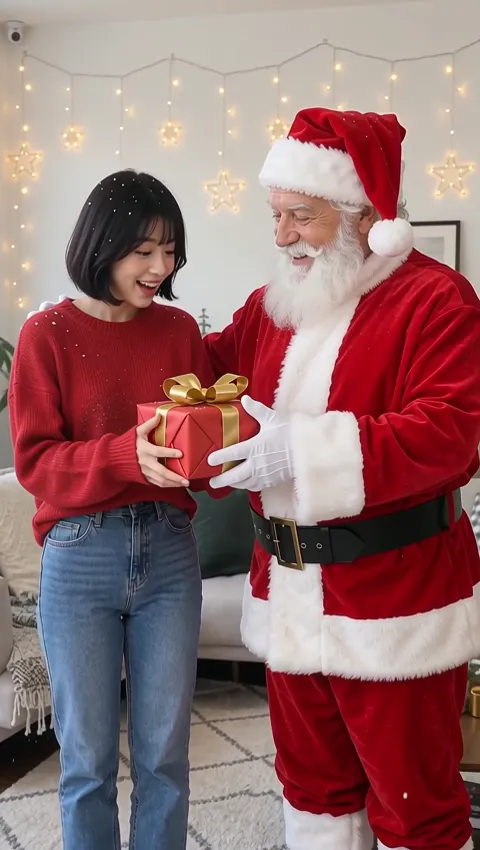
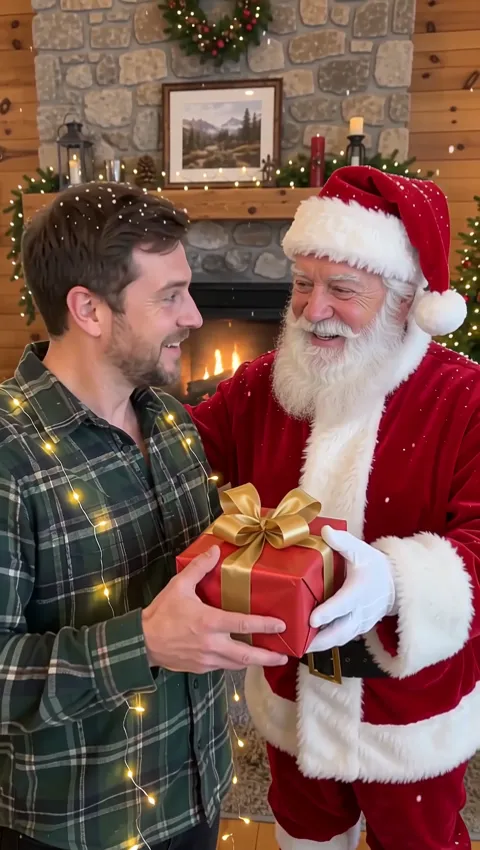
Make an AI Santa video from one photo: snow begins to fall, Santa steps in beside the person, laughs and hands over a wrapped gift. The original background stays exactly where it was, and you see the credit cost before you generate.
Only upload photos of yourself, your own children, or people who agreed to appear in the clip.
Free video, one a day without an account · Seedance 1.0 Pro Fast · 480p · 5s
1 left today
 Still
StillWan 3.030 credits
 Still
StillWan 3.030 credits
 Wan 3.0
Five Seconds of Christmas, Moment by Moment
The visit is written into the preset, so you only need the photo. Here is roughly how the clip unfolds:
| Time | What you see and hear |
|---|---|
| Start | Soft snowflakes begin to fall and golden fairy lights twinkle around the person, who smiles at the camera |
| Middle | Santa Claus, with a full white beard and a red suit trimmed with white fur, walks into the frame, waves and laughs |
| End | Santa hands over a red present tied with a gold bow, the person takes it with a delighted smile, and Santa gives a thumbs-up |
Unlike a costume effect, this one leaves the person and the place exactly as they were. The living room, the front porch or the snowy street from your picture remains in the shot, which is why the clip feels like Santa really stopped by. On the soundtrack you hear soft sleigh bells and Santa's warm laugh, with no music layered on top.
How to Make a Personalized Santa Video
Upload one photo of one person
Any single person works, as long as the face is clearly visible: a child in front of the tree, a grandparent in an armchair, a friend on a snowy sidewalk. Because the background is kept, choose a photo where the setting already looks the way you like. Leaving some room on one side of the person gives Santa space to step in.
Leave the details empty, or add one
The details field takes up to 500 characters and works as a light hint on top of the built-in visit. Small touches suit it best, such as a bigger, more surprised reaction or the person hugging the present at the end; extra objects may not show up. Santa, the snow and the gift appear in every clip regardless.
See the cost and generate
The default setup is Wan 3.0 at 480p, five seconds long with sound, and it comes to about 30 credits. The precise number sits on the button before you commit, and an attempt that fails is refunded on its own. Want a different model? The menu has several, and the visit is carried over to each one.
Download and surprise someone
Save the clip, then play it on Christmas morning, send it to relatives or post it. Free clips are watermarked; paid plans and credit packs give you clean files.
Who Should Get a Visit from Santa
- Kids who still write letters to the North Pole. Use a photo of your own child by the tree and play the Santa Claus video over breakfast on December 25.
- Grandparents who live far away. A clip of Santa handing Grandma a present, in her own living room, makes a sweet message for the family chat.
- Holiday greetings instead of a card. Send a short Santa clip to friends rather than a static e-card, with your wishes typed underneath.
- Phone-first social posts. Upload a vertical photo to get a vertical clip for TikTok, Reels or Shorts, and keep the person slightly off-center so Santa has room to appear.
- Teams, classes and clubs. With everyone's okay, make one clip per person and show them together at the holiday party.
Prefer something sillier? Try the AI elf video, where the person turns into a dancing elf in Santa's workshop. If you want Santa doing something else entirely, write your own scene with the image to video AI tool. The AI Christmas video page puts both holiday effects side by side.
What Makes a Good Santa Photo
| Photo | Why it helps |
|---|---|
| One person, face toward the camera | The reaction to the gift is the payoff, so the face needs to be visible |
| Indoors by a tree or a fireplace | The kept background already looks festive before Santa arrives |
| Some free space beside the person | Santa has somewhere to stand without covering them |
| Hands free, nothing in front of the body | The present is easier to hand over and take |
- Good, even light on the face keeps the person recognizable throughout the clip.
- Skip photos with other people in them; the preset adds exactly one extra figure, and that is Santa.
- If the first result isn't quite right, try a different photo before you rewrite the details.
The default model is described on the Wan AI video generator page, including its other resolutions and lengths.
Keep Santa's Visit Kind
- Your photo or a yes. Upload pictures of yourself, of your own children, or of people who agreed to be in the clip.
- Children through parents. If a child is in the photo, you should be their parent or guardian, or have that person's okay.
- No public figures. Celebrities, politicians and influencers stay out unless they have given permission.
- Say it's AI when you post. A clip shared publicly should say it was made with AI, even when the audience at home is happy to believe in Santa.
Photos you upload are not used to train AI models. The video model provider gets them only so it can produce your clip.
Santa Video FAQ
Is this a personalized Santa video where Santa says my child's name?
No. Santa doesn't speak in this clip, so there is no voice message, no name and no lip sync. It is personal because it starts from your own photo: your child, your living room, and Santa stepping in to hand over a present. The sound is sleigh bells and Santa's laugh.
Can I make an AI Santa video for free?
Yes, within limits. Each day a guest can create one clip without registering. That free clip comes from Seedance 1.0 Pro Fast: 480p, five seconds, watermarked and with no sound. A new account gets a single grant of 30 credits, which lasts 30 days and pays for roughly one Santa visit with audio on Wan 3.0, plus 5 credits daily that only count together with a balance you already have.
How many credits does a Santa clip use?
About 30 at the default: Wan 3.0, 480p, 5 seconds, with sound. A different model changes the price; a quick silent Seedance 1.0 Pro Fast version costs 6 credits. You always see the cost on the button first, and a failed clip returns its credits. The pricing page lists our plans and credits.
Will my background change?
No. The preset keeps the background, the person's clothes and their pose from your photo, and only adds snow, fairy lights, Santa and the present. That makes it a good fit for photos taken at home, where the familiar room is part of the surprise.
Does Santa look the same in every clip?
The preset always asks for the same classic Santa: a full white beard, a red suit with white fur trim and a red hat. Small details such as his face or the wrapping paper can differ from clip to clip, because each Santa Claus video is generated fresh rather than pasted in from a template.
Can Santa visit a group photo?
The preset is built for one person, so group shots aren't a good fit. For a family, make one clip per person and play them one after another, or pick a photo of the child the surprise is meant for.
More ways to animate a photo
Image to Video AI
Turn any photo into a short AI video. Upload an image, describe the motion and pick Kling, Veo, Hailuo, Seedance or Wan. Start free with 30 credits.
Animate Photos with AI and Make Pictures Move
Animate a photo with AI: add natural motion, blinking, hair and camera movement to any picture, then download a short video. Free credits to try.
AI Christmas Video
Make an AI Christmas video from one photo: dance as an elf in Santa's workshop or get a visit from Santa with a gift. 5-second clips with festive sound.
AI Elf Video
Upload one photo and get a 5-second AI elf video: you in a green elf costume, dancing in Santa's workshop to a jingle-bell tune. See the credit cost first.
Let Santa Stop By
Pick a photo of the person you want to surprise, keep the built-in visit, and check the price before you make your AI Santa clip.