
Christmas 2026 · Elf dance · With sound
AI Elf Video: Elf Yourself from One Photo
Elf yourself with AI: upload one photo of a person and get a short clip of them in a green elf costume, dancing in Santa's workshop to a jingle-bell tune. Their face stays recognizable, and the credit cost shows before you generate.
Only upload photos of yourself or of people who agreed to become a dancing elf.
Free video, one a day without an account · Seedance 1.0 Pro Fast · 480p · 5s
1 left today
 Still
StillWan 3.030 credits
 Still
StillWan 3.030 credits
 Wan 3.0
What Happens in Your Elf Clip
The whole scene is built into the preset, so there is no prompt to write. Each clip runs five seconds and plays out in two beats.
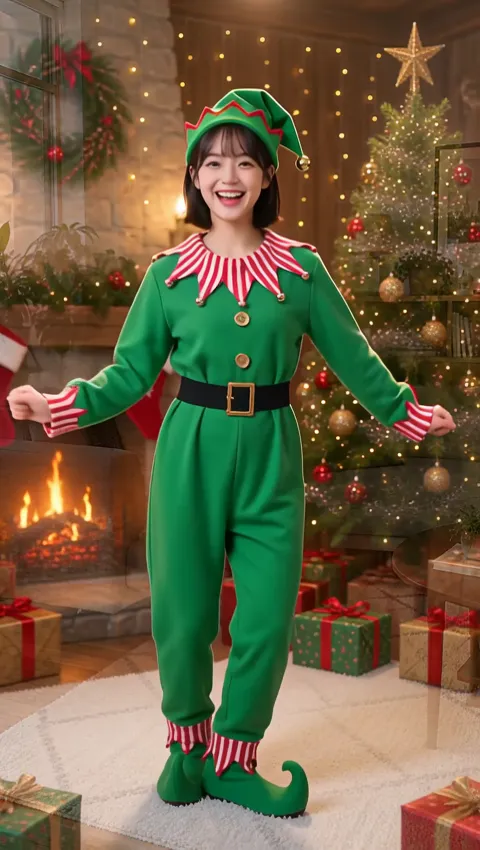
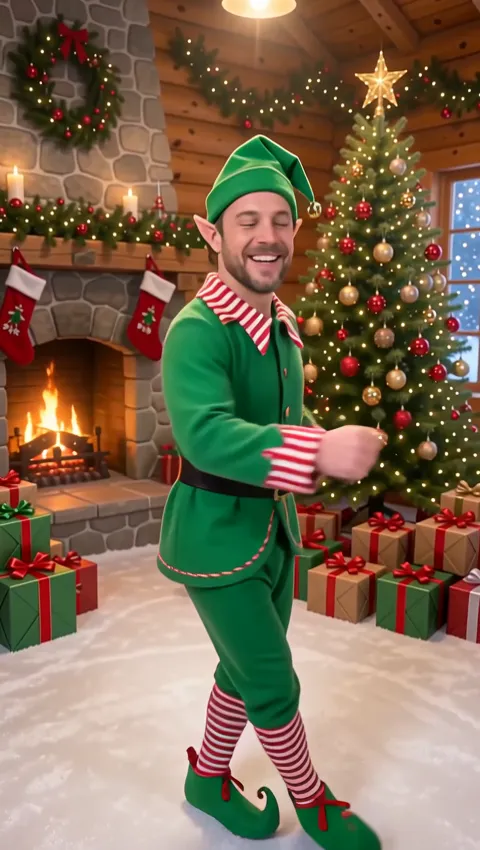
- The switch, in the first second. Sparkles and snowflakes swirl around the person, and their clothes turn into a bright green elf outfit with a red-and-white striped collar, a pointy hat with a tiny bell and curly shoes. The room behind them becomes a cozy Santa's workshop with a lit tree and wrapped presents.
- The dance, for the remaining four seconds. The elf version bounces, kicks, swings both arms and spins once, smiling straight at the camera while an upbeat jingle-bell tune plays.
Face, hairstyle and skin tone carry over from your photo, so friends know who is under the hat right away. That is the fun of an AI elf: the costume is silly, but the person wearing it is real.
How to Make an Elf Dance Video
Pick a photo of one person
A single person with a clearly visible face is all the preset needs. Full-body shots work best, because the costume reaches down to the shoes and the dance uses arms and legs. A head-and-shoulders selfie still works; the model just has to invent more of the outfit. Keep other people out of the frame.
Add a small touch, or nothing
You can type up to 500 characters of extra detail, but the box is a light hint rather than a new script. Expression and pace work best, such as a bouncier step or a wink at the very end; extra props may not appear. The costume, the workshop and the dance are part of every clip whatever you write.
Check the price, then generate
By default the elf renders on Wan 3.0 at 480p for 5 seconds, sound included, for about 30 credits. The button shows the exact figure before anything starts, and a failed generation puts its credits back in your balance automatically. Other models are in the menu too, and the elf scene travels with whichever one you choose.
Save it and send it
Download the clip and drop it into the family group chat, a holiday e-card or your Stories. Free downloads include a watermark, which disappears with a plan or credit pack.
Ideas for Your Christmas 2026 Elf Clips
- The whole family, one elf at a time. Make a clip for each person from their own photo, then string them together into one holiday greeting. Grandparents tend to love seeing the grandkids in pointy hats.
- Office party icebreaker. Collect a photo and a yes from each coworker, then play the elf dance video on the big screen before dinner.
- A card that moves. Send a five-second clip instead of a static e-card, and type your message in the chat underneath.
- Throwback elves. A scanned print of a parent as a teenager makes a funny contrast once the costume appears. Crop it so only one person is in the picture.
- Vertical posts for TikTok, Reels and Shorts. Start from a vertical, full-body photo so the elf fills a phone screen, and keep the person centered so captions don't cover the hat.
Want the moves without the costume? The AI dance video generator keeps the person's own outfit and setting and adds an upbeat solo dance. For a quieter holiday moment, make an AI Santa video in which Santa steps in beside the person with a present. You'll find both festive effects together on our AI Christmas video hub.
Photo Tips for a Better Elf
| Your photo | What to expect | Tip |
|---|---|---|
| Full body, standing | The complete costume down to the curly shoes, plus the full dance | Leave some space above the head for the hat |
| Waist up | Costume on top, while the model fills in the legs | Fine for a quick laugh in the group chat |
| Close-up selfie | A recognizable face, with more of the body invented | Step back and retake the photo if you can |
| Several people | Not what the preset is built for | Crop down to one person first |
- Light on the face matters most, since the face is what keeps the elf recognizable.
- Sunglasses, masks, scarves over the chin and hands near the face all make it harder to keep the likeness.
- A plain or tidy background is fine; it will be replaced by the workshop anyway.
- If the first clip feels off, try a different photo before you change the details. The photo has the bigger effect.
To build a holiday scene of your own from scratch, put the same photo into the image to video AI tool, where you pick the model and write every word of the prompt.
Only Turn People into Elves When They're in on It
- You, or someone who said yes. Use your own photo, or one of a person who has heard your plan and is happy to play along.
- Kids through their parents. Photos of children should be your own kids, or come with a parent's or guardian's okay.
- No celebrities. Famous faces such as actors, athletes and streamers need their own permission, so leave them out.
- Friendly fun only. Don't use the clip to embarrass anyone, and say that it was made with AI when you post it publicly.
Nothing you upload is used for AI training. Your photo is passed to the video model's provider for a single purpose: generating this clip.
Elf Video FAQ
Is this the official Elf Yourself app?
No. Elf Yourself is a trademark of JibJab, and ImageVideoAI is not affiliated with that company or its app. This is our own elf effect: you upload a photo, and an AI video model animates that person in a costume, dancing in a workshop. There are no face-cutout templates, and every generation produces a new five-second clip.
Can I make an elf yourself video for free?
Yes, up to a daily cap. Without an account, you can make one elf clip every day; that free version comes out of Seedance 1.0 Pro Fast, so expect 480p, five seconds, a watermark and no audio. A free account unlocks a one-off grant of 30 credits, good for 30 days and roughly the price of a single elf with sound on Wan 3.0, plus 5 more each day that can't buy a clip on their own.
How many credits does an AI elf clip cost?
About 30 credits on the default setup, which is Wan 3.0 at 480p for five seconds with sound. Switching models moves the price up or down; for example, a soundless test on Seedance 1.0 Pro Fast takes 6 credits. The generate button shows the price before anything starts, and failed videos refund their credits. See the plans and credits page for what each tier costs.
Does the elf clip have music?
Yes. Wan 3.0 generates sound together with the picture, and the preset asks for an upbeat jingle-bell tune. You can't choose a specific song, though. For a particular track on TikTok or Instagram, add it inside the app, where the music is licensed. The free guest clip uses a different model and comes without sound.
Can two people dance in the same elf video?
Not with this preset. It is designed for one photo of one person, so group shots can give odd results. Make a separate clip for each family member instead, then join them in any video editor or straight in your social app.
Will the elf still look like me?
That is what the preset is built for. It keeps the face, hairstyle and skin tone from your photo and changes only the clothes and the background. A sharp, well-lit picture with nothing covering the face gives the model the most to work with.
More ways to animate a photo
Image to Video AI
Turn any photo into a short AI video. Upload an image, describe the motion and pick Kling, Veo, Hailuo, Seedance or Wan. Start free with 30 credits.
Animate Photos with AI and Make Pictures Move
Animate a photo with AI: add natural motion, blinking, hair and camera movement to any picture, then download a short video. Free credits to try.
AI Christmas Video
Make an AI Christmas video from one photo: dance as an elf in Santa's workshop or get a visit from Santa with a gift. 5-second clips with festive sound.
AI Santa Video
Turn one photo into a 5-second AI Santa video: snow falls, Santa steps in beside the person, laughs and hands over a gift. Your background stays as it is.
Put on the Pointy Hat
Choose a full-body photo, keep the built-in workshop scene, and check the credit cost before you press generate.