
Dance song template · 10 s, song included
Gnarly Dance AI: Do the KATSEYE Routine from One Photo
Give this template one full-body photo and the person in it performs the Gnarly dance, the sharp, punchy KATSEYE choreography that took over TikTok. The 10-second clip keeps the song, so you can post it as it is.
Copies the trend's original moves and keeps its song · 10s · 480p
Only use photos of yourself or of people who agreed to dance on video.
Sign in to use these settings, with 30 free credits · AI Dance Move v2 · 480p · 10s
 Still
StillAI Dance Move v240 credits
 AI Dance Move v2
Making your Gnarly dance video
Upload a clear full-body shot
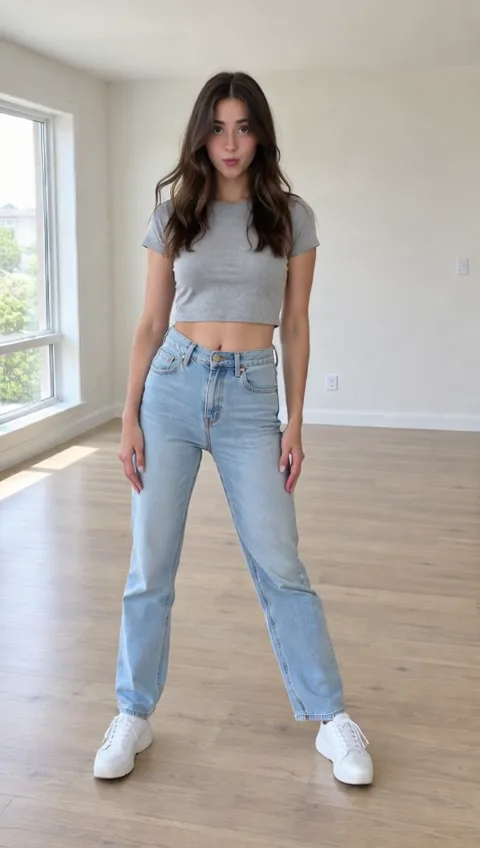
Gnarly is built on hard hits: quick arm snaps, stomps and freezes. The model reproduces them best when it can see every limb, so use a photo of one person standing, from head to shoes, with arms away from the body. Seated, cut-off or group shots blur those hits.
Describe the look if you want
A fan's dance clip supplies the routine, so you write nothing about the moves. The optional box is for appearance only, like "baggy jeans, white crop top" or "pink hair". It won't change which steps you get.
Check the price, then render
The template always uses AI Dance Move v2 for a 10-second, 480p clip that costs 40 credits; the button shows it before you confirm. Should the render fail, the full 40 credits are returned automatically.
About the Gnarly dance
"Gnarly" is a 2025 single by the girl group KATSEYE. Its choreography, arranged by the group's performance directors Sohey Sugihara and Grant Gilmore, mixes sharp, decisive hits with a few deliberately odd moments, and fan re-creations carried it across TikTok. It was nominated for Favorite TikTok Dance at the 2026 iHeartRadio Music Awards.
Your clip covers the opening 10 seconds of a fan's cover, not the full song. This template is not affiliated with KATSEYE or their label.
Styling a Gnarly video
The trend has a look as much as a routine, and the outfit in your photo carries into the clip. A few combinations that read well:
| Photo outfit | Effect in the clip |
|---|---|
| Baggy jeans and a fitted top | Matches the trend's most common look |
| Sporty set, sneakers | Stomps and kicks stay easy to follow |
| Bold colour against a plain wall | The hits pop on a small screen |
| Your own anime-style character | The routine in your art style |
Dark clothes on a dark background and long coats that hide the legs make the fast moves harder to read.
How close is it to the real routine?
The motion follows the reference clip frame by frame, so the counts, the arm snaps and the freezes land where the dancer put them. What changes is the body doing them: your photo's proportions, clothes and hair. Very loose clothing can make a stomp look softer, and a photo taken from a low angle can make the legs look longer than the original. For the cleanest copy, shoot the photo at chest height, straight on.
Posting your Gnarly clip
Short-form apps reward vertical video, so a tall photo gives the best fit. Post it with the trend's hashtag, or duet a friend's real attempt with your AI version beside it. Every other trend template lives on the AI dance video hub.
Who can be in the clip
Use photos of yourself or of people who've said yes. Ask a parent or guardian before using a child's picture. Leave out photos of KATSEYE members and other celebrities, and don't make clips that mock anyone. Your uploads are never used for AI training.
Gnarly dance FAQ
Is the Gnarly dance AI template free?
Sign-up is free, and a Gnarly clip costs 40 credits. New accounts start with 30 credits, so you'll need to add a credit pack or a plan before the first render. After that, free accounts can make it too; their videos come with a watermark.
Is the song in the video?
Yes. The audio of the reference clip, KATSEYE's song, is kept and synced with the moves. Music rules differ between apps and countries, so check them before posting, and use the app's AI-generated label when it offers one.
Which part of the routine do I get?
The first 10 seconds of the reference dance: a short, recognisable stretch of the choreography. You can't pick another section, alter the steps or make the clip longer. If you'd rather write the movement yourself, start from a prompt on our photo animation tool.
Will the dancer still look like me?
The model keeps the face, hair and clothes from your photo while it moves the body. The sharper and brighter the photo, the more detail survives. Fast turns can soften the face for a frame or two, so watch the clip once before you share it.
More ways to animate a photo
Image to Video AI
Turn any photo into a short AI video. Upload an image, describe the motion and pick a model, from Kling and Veo to Grok Imagine and Vidu. Start free with 30 credits.
Animate Photos with AI and Make Pictures Move
Animate a photo with AI: add natural motion, blinking, hair and camera movement to any picture, then download a short video. Free credits to try.
Coco Chanel Dance AI
Make anyone do the Coco Chanel dance with AI. Upload one full-body photo and get a 10-second clip of the Tyla Chanel trend with the song, ready for TikTok.
King Nasir Dance AI
Make anyone do the King Nasir dance with AI. Upload one full-body photo and get a 10-second clip with the trend's moves and original audio, ready for TikTok.
Do the Gnarly dance
Choose a full-body photo, check the 40-credit price on the button, and make your own take on the KATSEYE routine.