
Trend template · 10 s of Tyla's "Chanel"
Coco Chanel Dance AI: Do the Tyla Chanel Trend from One Photo
Add a single full-body photo, and the person in it takes on the Coco Chanel dance, the hip-led, confident routine set to Tyla's "Chanel". The 10-second clip keeps the song, so it's ready for TikTok, Reels or Shorts.
Copies the trend's original moves and keeps its song · 10s · 480p
Only use photos of yourself or of people who agreed to dance on video.
Sign in to use these settings, with 30 free credits · AI Dance Move v2 · 480p · 10s
 Still
StillAI Dance Move v240 credits
 AI Dance Move v2
How the Coco Chanel template works
Pick a photo with hips, arms and hair in view
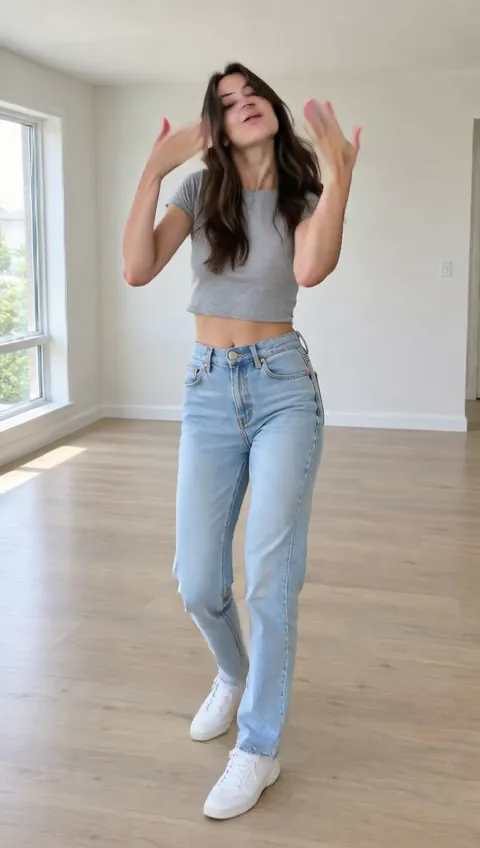
The routine is all attitude: hip sways, arm lines and a hair flip or two. Use one person standing, whole body in the frame, ideally with their hair visible and their arms free. Close-ups, sitting poses and group photos leave too much for the model to invent.
Add a line about the look, or nothing at all
The steps come from a reference clip of a dancer doing the trend, so there's nothing to choreograph. If you want, describe the styling, such as "black outfit, knee-high boots"; the moves and the song stay exactly the same.
Make it
Every Coco Chanel clip is made with AI Dance Move v2, lasts 10 seconds at 480p and costs 40 credits. You see the price on the button first, and any render that fails hands its credits straight back.
Why it's called the Coco Chanel dance
The trend is set to Tyla's song "Chanel", and its Coco Chanel line gave the dance its name on TikTok. The challenge collected millions of videos within weeks, and Tyla performed the TikTok choreography on The Tonight Show in January 2026.
This template copies the trend's moves from a dancer's clip and applies them to your photo. It is not affiliated with Tyla or with Chanel.
Dressing the part
What's in the photo is what dances, so the outfit sets the tone of the whole clip.
| Photo | Result |
|---|---|
| A going-out look, heels or boots | Closest to the trend's mood |
| Fitted top, loose hair | Hair flips and arm lines read clearly |
| Bright colour on a plain background | Stands out in a busy feed |
| Your own character in a pose | The routine in its art style |
One thing to know: the reference clip moves in a little closer about halfway through, so your video may zoom in slightly at the same moment. Keep some space above the head so nothing gets cropped.
Taking a photo for the Chanel dance
If you're shooting a new picture rather than picking an old one, stand about three steps from the camera with the phone at chest height. Face the lens, keep your weight on both feet and let your arms hang loose; the dance starts from there. Shoot against a wall with nothing behind you, in daylight or a bright room, and wear the shoes you want in the video. A photo like that gives the model clean edges to follow through every hip sway.
More dance songs
The same steps work for the other trend templates, from the King Nasir meme to KATSEYE's Gnarly, all on the AI dance video page, with a general routine to restyle as well.
Using photos the right way
Choose a photo of yourself, or of an adult who's happy to be in it. The routine has an adult, confident attitude, so it isn't a good fit for pictures of children. Don't use photos of Tyla or other public figures, and don't make clips that mock anyone. Uploaded photos aren't used to train AI models.
Coco Chanel dance FAQ
Is the Coco Chanel dance AI template free?
Creating an account is free; each Coco Chanel clip costs 40 credits. That's 10 more than the 30 sign-up credits, so adding a credit pack or a plan comes first for most people. With enough credits, free accounts can make it as well, watermarked.
Is Tyla's song in the video?
Yes. The reference clip's audio, Tyla's "Chanel", stays in your video and lines up with the moves. Before posting, check how the app you use handles music, and turn on its AI-generated label if there is one.
Can I change the moves or the length?
No. The routine, the 10-second length and the 480p resolution are fixed by the reference clip. You can describe how the dancer looks, but not what they do. To invent motion of your own, describe it in a prompt on our photo-to-video page.
Will it still look like me?
Your face, hair and outfit come from the photo, and the model keeps them while the body moves. A sharp, evenly lit picture holds the most detail. During quick hair flips the face can blur briefly, so watch the result before posting.
More ways to animate a photo
Image to Video AI
Turn any photo into a short AI video. Upload an image, describe the motion and pick a model, from Kling and Veo to Grok Imagine and Vidu. Start free with 30 credits.
Animate Photos with AI and Make Pictures Move
Animate a photo with AI: add natural motion, blinking, hair and camera movement to any picture, then download a short video. Free credits to try.
King Nasir Dance AI
Make anyone do the King Nasir dance with AI. Upload one full-body photo and get a 10-second clip with the trend's moves and original audio, ready for TikTok.
Gnarly Dance AI
Make anyone do the Gnarly dance with AI. Upload one full-body photo and get a 10-second clip of the KATSEYE routine with the song, ready for TikTok.
Do the Coco Chanel dance
Pick a full-body photo with some attitude, check the price on the button, and get your own Chanel dance.