
Toddler photo · Gentle moves · Sound
AI Baby Dance: A Cute Dancing Video from One Photo of Your Little One
Turn a favourite photo of your toddler into a five-second AI baby dance: a gentle bounce on the spot, clapping hands, a side-to-side sway and a giggle, with sound. The moves are kept soft and age-appropriate on purpose.
Only upload photos of your own child, or with the parents' permission.
Free video, one a day without an account · Seedance 1.0 Pro Fast · 480p · 5s
1 left today
 Still
StillMiniMax H315 credits
 Still
StillMiniMax H315 credits
 MiniMax H3
Making a baby dancing video, step by step
Choose a standing photo of your child
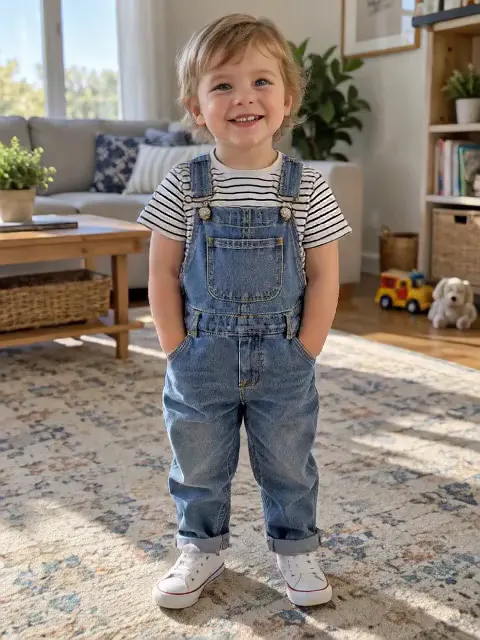
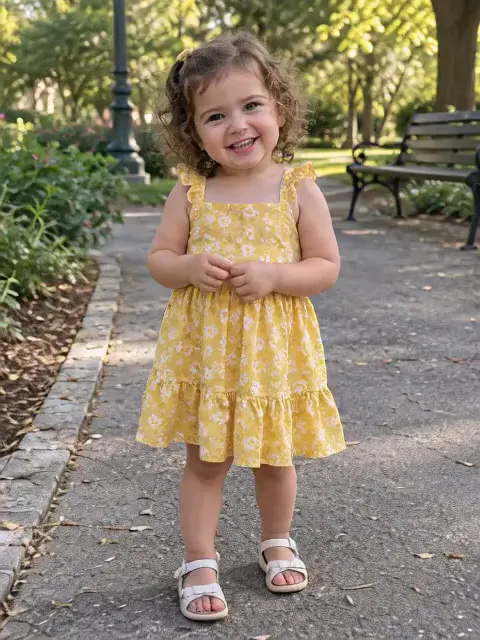
Toddlers who are standing, with their feet and hands in view, give the most natural dance. A baby lying on a blanket or held in someone's arms has no room to bounce, so those photos produce very little movement. One child per photo; the effect is written for a single little dancer.
Leave the dance as it is
The bounce, the claps and the sway are built in and were chosen to look like a real toddler dancing, not an adult routine on a small body. Use the optional box for the setting: a birthday party, balloons behind them, the garden, or a big giggle to finish.
Generate and save the clip
On the standard setting the video is made by MiniMax H3: 480p, five seconds, 15 credits, with sound created alongside the motion. You see the cost before you start, and if a render fails your credits come back automatically.
What the dance looks like
Before launch we generated two fictional toddlers, a boy in denim overalls and a curly-haired girl in a yellow dress, and ran both through the effect. They bounced, clapped and swayed, laughing, while their faces, hair and clothes stayed the same as in the photo.
The effect deliberately avoids fast spins, big jumps and grown-up choreography. That keeps the motion believable for a small child and keeps the clip something you'd happily show grandparents.
Ideas for an AI baby dance video
- First birthday invitations. A dancing birthday child is a sweeter invite than a static card.
- Family group chats. Grandparents far away love a short clip of the little one "dancing".
- Milestone posts. Pair the clip with "first steps" or "one year old today".
- Keepsakes. Download the video and keep it with the original photo, so the still and the moving version sit side by side in the family album.
- Thank-you notes. A tiny dance is a lovely way to thank relatives for a gift or a visit.
- Growing-up series. Make one dance from a photo every few months and watch how your child changes from clip to clip.
Curious what your future child might look like? The AI baby generator predicts a baby's face from two parents' photos, and the result can dance here too.
There's also a general baby video page with more ways to animate a photo of a child.
Children's photos: our rules and your choices
- Upload only photos of your own child, or photos whose parents have agreed.
- The effect only makes cute, age-appropriate dancing; anything suggestive is not allowed, whatever is typed in the details box.
- Your uploads are never used to train AI models and are sent to the video model provider only to make your clip.
- Videos stay in your history for a week on a free account and for half a year with paid access; remove any of them at any time.
- Think before posting a child's video publicly; a private chat or a family album is often the better place.
AI baby dance FAQ
Is the AI baby dance free?
You can try it without paying. Visitors get a single daily clip from our lightweight model, silent and watermarked, and a free account comes with 30 credits to spend within its first month, enough for two baby dances, with 5 more every day. Paying removes the watermark.
What kind of photo works best?
A clear photo of one standing toddler, roughly head to toe, in good light. Babies who can't stand yet usually move very little, because the dance needs legs to bounce on. Avoid photos where the face is turned away or covered.
Can I choose a song?
No. The model makes upbeat sound with the dance, but there's no song list. If you want a particular children's song, add it in your video or social app afterwards.
Will my child's face change?
Holding on to the face, hair and outfit is part of the built-in instruction, and both sample toddlers stayed recognisable. Results can still differ between runs; if one doesn't look like your child, generate again, and note each run is charged.
More ways to animate a photo
AI Baby Video Generator
Turn a photo of your baby or toddler into a short dance clip with sound. Use your own child's photo, add a setting if you like and see the cost first.
AI Baby Generator
Upload a photo of each parent and see what your future baby could look like. Free AI baby generator to start: sign up for 30 credits, one portrait per run.
Animate Photos with AI and Make Pictures Move
Animate a photo with AI: add natural motion, blinking, hair and camera movement to any picture, then download a short video. Free credits to try.
Image to Video AI
Turn any photo into a short AI video. Upload an image, describe the motion and pick a model, from Kling and Veo to Grok Imagine and Vidu. Start free with 30 credits.
Watch your little one dance
Pick a standing photo of your toddler, add a party or a garden if you like, and get ready for the giggles.