
One selfie · Groove to the beat · Sound
Face Dance AI: Make Your Selfie Groove to the Beat
Not every photo shows a full body, and a face dance doesn't need one. Upload a selfie or a portrait and it comes back as a five-second clip of you bobbing your head to the beat, raising your eyebrows, winking and breaking into a big smile, with sound.
Only use photos of yourself or of people who agreed to it.
Free video, one a day without an account · Seedance 1.0 Pro Fast · 480p · 5s
1 left today
 Still
StillMiniMax H315 credits
 Still
StillMiniMax H315 credits
 MiniMax H3
From selfie to face dance
Upload a clear selfie
Any head-and-shoulders photo with a clearly visible face works: eyes open, facing the lens more or less, mouth not covered. Phone selfies are ideal. Good light keeps the expression changes natural; a dark or heavily filtered photo makes them look stiff.
Keep the groove, add a detail
The head bobs, tilts, eyebrow raises and the wink come preloaded, so an empty box is perfectly fine. Typed details only add small touches, like headphones, sunglasses, party lights behind you or a laugh at the end.
Generate, then post
Unless you change it, MiniMax H3 makes the clip: five seconds, 480p, 15 credits, with a soundtrack it composes on the fly. The total is shown before you click, and if the render breaks, the credits are refunded right away.
What a face dance looks like
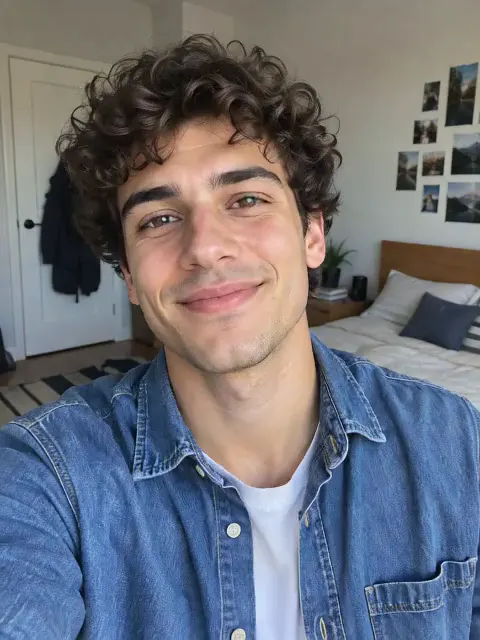
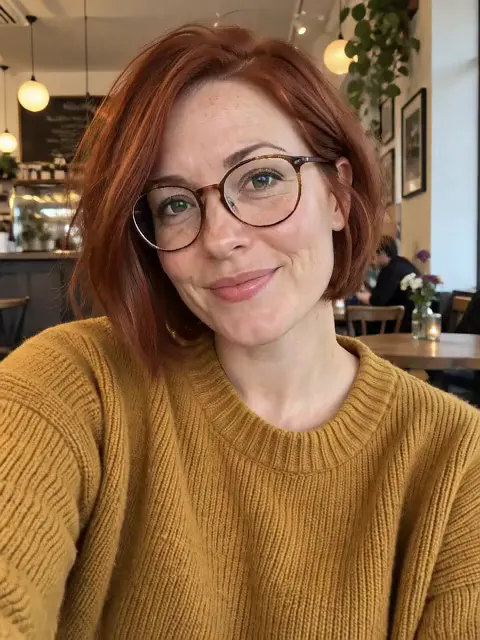
Two selfies went through the effect before it was published: a man with curly hair at home and a woman with a red bob and round glasses in a cafe. In both clips the head moved to the beat, the eyebrows went up, a wink and a wide smile followed, and the shoulders bounced a little. The faces, glasses and hair stayed the same, and the framing stayed close.
| Photo | Result |
|---|---|
| Selfie or headshot, face to camera | Full groove with expressions; best result |
| Face in profile | Less expression, more head movement |
| Group photo | Unpredictable; use a photo of one person |
| Full-body photo | Works, but the face is small; try the K-pop dance instead |
Have a full-body picture? The K-pop dance effect uses the whole body, with footwork and a final pose.
What people make with face dance
- Reaction memes. Your grooving face is the perfect reply to good news.
- Birthday wishes. A face dancing to a beat beats a "happy birthday" text.
- Profile videos. Five seconds fits a short intro on TikTok, Reels or Shorts.
- Old portraits. A family photo with a clear face can groove too, with the family's OK.
- Team and class shout-outs. Turn each teammate's headshot into a short groove and stitch them together for an end-of-season video, with everyone's agreement.
- Streamer and creator intros. A face dance makes a quick, friendly opener before the real content starts, and it reads well even on a small phone screen.
Want a softer motion, like a slow smile and a blink, without the beat? Animate photo AI is the calmer option for portraits.
Free to start, fair to use
You can try it daily without registering: one free clip per day from the entry-level model, mute and marked. Register and a month's worth of 30 starter credits covers two face dances, while 5 fresh credits appear each day. Upgrading to a plan or credit pack gives you unmarked downloads and the right to use them in commercial posts.
Use your own face or the face of someone who said yes. Don't make face dances of celebrities without permission, and don't post one meant to mock the person in it.
Face dance FAQ
What is a face dance?
A short clip where a still face moves to music: head bobs, tilts, eyebrow raises and expressions on the beat, while the body stays mostly still. It is a popular meme and reaction format because it only needs a selfie, and because a face fills the screen it reads well on phones even with the sound off.
Is this a face dance app?
It works in the browser on your phone or computer, so there's nothing to install. Upload a selfie, generate, and download the clip to post wherever you like.
Can I pick the song?
No. The model makes its own upbeat sound with the motion. To dance to a particular song, add it in your editing or posting app.
Will my face change?
Your face is meant to stay exactly as it is, and both sample selfies stayed true to the originals; only the expression moves. Glasses, freckles and hairstyles carry through the clip too. Expressions such as the wink and the smile are added, so some frames will look different from your photo by design.
More ways to animate a photo
K-Pop Dance AI
Make a K-pop dance video from one full-body photo: sharp idol-style moves, a hair flip and a final pose, with sound. 5 seconds, ready for TikTok. Try it free.
AI Dance Video Generator
Make a photo dance with AI. Upload one full-body picture of a person, set the scene if you like, and get an upbeat dance clip with sound for TikTok or Reels.
Animate Photos with AI and Make Pictures Move
Animate a photo with AI: add natural motion, blinking, hair and camera movement to any picture, then download a short video. Free credits to try.
Image to Video AI
Turn any photo into a short AI video. Upload an image, describe the motion and pick a model, from Kling and Veo to Grok Imagine and Vidu. Start free with 30 credits.
Give your selfie a beat
Choose a clear selfie, add headphones or a laugh if you like, then let your face catch the rhythm.