
One photo · 5 or 10 s · Frost, ice crystals and cold mist
AI Frozen: Turn One Photo into a Frost Freeze-Over Video
Upload a portrait, a full-body shot, your pet or a product photo, and the AI turns it into a short clip where the cold takes over. Frost creeps in from the edges of the frame, ice crystals branch across the surfaces, the outlines of your subject turn white and a thin cold mist drifts through the air, until the whole moment looks frozen in time. The face and the key details stay clear the whole way through, so it is still recognizably you, your dog or your thing.
If a person is in the photo, use yourself or someone who agreed to it.
Free video, one a day without an account · Seedance 1.0 Pro Fast · 480p · 5s
1 left today
 Still
MiniMax H315 credits
 Still
MiniMax H315 credits
 MiniMax H3
How to make an AI frozen video
Upload one clear photo
Pick a sharp, well-lit photo where the subject is easy to see: a selfie, a full-body shot, a cat on the sofa, a sneaker on a table. Good light and some contrast around the edges give the frost more to cling to. The clip starts on your photo, so the framing you choose is the framing you get.
Pick a freeze style if you want
The frost, the ice crystals and the cold mist are built in. The optional box tells the model how far to take it: "light frost on the edges only", "fully frozen into clear ice", "soft snow falling while it freezes". Leave it empty and you get a light to medium frost that keeps the subject easy to see.
Generate, check and download
MiniMax H3 renders a 480p clip: 5 seconds for 15 credits or 10 seconds for 30. Five seconds is a quick freeze for a transition; ten gives the frost time to spread slowly. The button shows the exact credits before you start, and a failed render refunds them. Switch model or resolution in the menu for a sharper file.
What the frozen effect asks the model for
The built-in instructions describe one continuous freeze-over and ask the model to keep your subject as it is.
| What we ask for | Why it matters |
|---|---|
| One continuous shot that starts exactly like your photo, with no cuts | The freeze reads as one moment, not a slideshow |
| Frost creeping in from the edges and corners toward the center | The cold builds up gradually instead of popping in |
| Ice crystals, frost along the outlines of hair, fur, clothes and objects, a light cold mist | Real ice textures, not a flat blue filter |
| Colors cooling to icy blue and silver white, ending on a still frozen moment | A clean "time has stopped" final frame for edits |
| Face, eyes and key details kept visible; frost never covers the face | The subject stays recognizable from start to finish |
| No flicker, flashes or morphing; no talking, humming, extra people, text or logos | A calm, clean clip you can drop into any video |
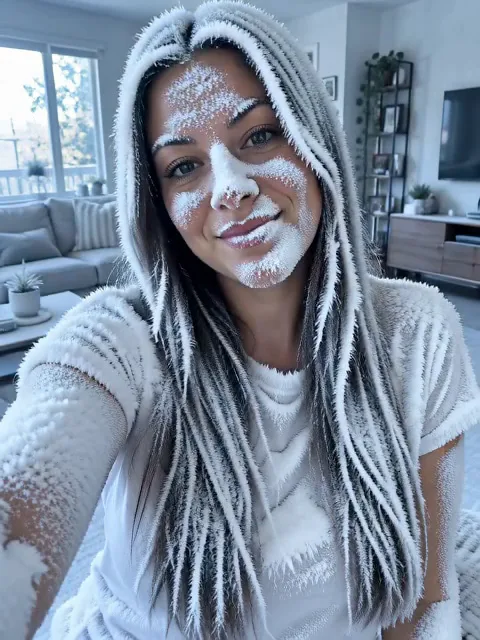
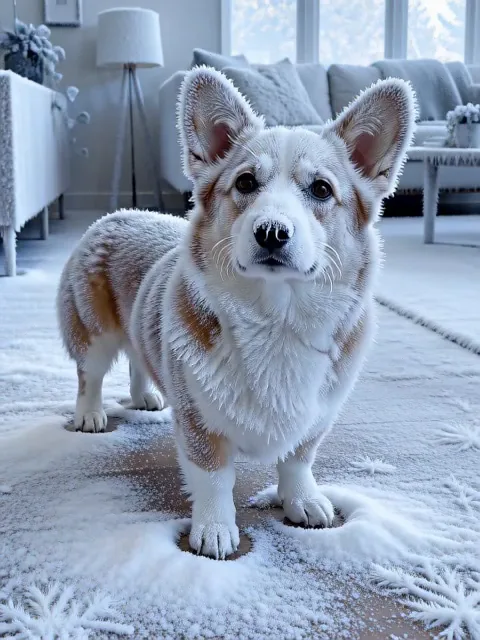
We tried it on two of our own AI-generated pictures at 5 seconds: a selfie of a young woman in her living room with the box left empty, and a corgi standing on a wooden floor with "frost on the fur and whiskers". Both froze over in one continuous shot without cuts or flicker: white frost spread through her hair, her shirt and the room, and over the corgi's fur, its ears and the floor around its paws, with a soft cold haze and a blue-white tint by the end. The corgi stayed clearly the same dog, its face clean. On the woman, the eyes and features stayed recognizable, but some frost speckles landed on her cheeks and nose and she closed her eyes for a moment, so expect a light dusting on faces in portraits; ask for "light frost on the edges only" to keep the face clearer, or generate again. For another one-photo effect with a big camera move, try Earth Zoom In.
Where a frozen clip fits
- Transitions. Freeze the last frame of one scene before you cut to the next, or use it as a "winter is here" beat.
- Freeze-frame moments. Stop a dramatic pause, a reaction or a punchline in ice.
- Fun shorts. Freeze your pet mid-zoomies or yourself on a cold morning for Reels, TikTok or Shorts.
- Product shots. Give a drink, a cooler, a winter jacket or a skincare bottle an icy reveal.
Want a fast camera move between two looks instead? The AI Slide Transition swipes from one scene to the next. Have a different motion in mind? Animate Photo moves any photo from your own description.
Price, free tries and fair use
You can try it free once a day: without logging in you get one daily clip from the starter model, mute and stamped with our mark. Signing up hands you 30 credits for the first month, which is two 5-second clips, and drips in 5 more credits daily. Buy a plan or credit pack for clean files without the mark.
If a person is in the photo, use yourself or someone who agreed to it, and leave out strangers, celebrities and public figures. Use product photos you own or have the right to use.
AI frozen FAQ
Which photos work best?
A sharp, well-lit photo with one clear subject: a portrait, a full-body shot, a pet or an object on a plain background. Dark, blurry or very busy photos leave the frost less to grab onto and make the face harder to keep clear.
Will the frost cover the face?
Mostly not. The built-in instructions keep the face, the eyes and the key details visible while the frost spreads around them. In our portrait test the eyes and features stayed clear, but a light dusting of frost landed on the cheeks and nose. For a cleaner face, ask for "light frost on the edges only", or generate again.
Can I make it more or less frozen?
Yes. Type the look in the optional box, from "light frost on the edges only" to "fully frozen into clear ice". Empty, it stays at a light to medium frost.
Should I pick 5 or 10 seconds?
Five seconds is a quick freeze that suits transitions and costs 15 credits. Ten seconds (30 credits) lets the frost creep in slowly and hold the frozen moment longer.
More ways to animate a photo
Earth Zoom In
Upload one photo and get a cinematic Earth zoom: the camera rises to space, then dives back through clouds, land and city to land on your subject.
AI Slide Transition
Upload one photo and get a short night-city clip: you run toward the camera, drop into a long knee slide with arms wide and stop at the lens with a smile.
Animate Photos with AI and Make Pictures Move
Animate a photo with AI: add natural motion, blinking, hair and camera movement to any picture, then download a short video. Free credits to try.
Image to Video AI
Turn any photo into a short AI video. Upload an image, describe the motion and pick a model, from Kling and Veo to Grok Imagine and Vidu. Start free with 30 credits.
One photo, frozen in time
Pick a clear photo and watch the frost take over in seconds.