
One photo · 5 or 10 s · A step-by-step makeover
Gender Swap Video: Watch Your Look Shift Step by Step in One Clip
Upload a clear portrait of yourself, or of an adult who said yes, and the AI makes a short clip where the styling changes in stages: hair first, then grooming and makeup, then the outfit, until the look reads as a different gender expression. The face, pose, camera and background stay the same, so it is still recognizably the same person from the first frame to the last. It is a playful visual makeover effect and says nothing about anyone's gender identity.
Upload a photo of yourself, or of an adult who agreed to it. No minors, celebrities or strangers.
Free video, one a day without an account · Seedance 1.0 Pro Fast · 480p · 5s
1 left today
 Still
MiniMax H315 credits
 MiniMax H3
How to make a gender swap video
Upload one clear portrait
Pick a sharp photo of one person, face fully visible, framed from the head and shoulders down to the upper body. Even light and a plain or tidy background give the cleanest change. Group shots, sunglasses, hands over the face or heavy filters make it harder for the model to keep the face steady. The clip opens on your photo, so crop it the way you want the shot framed.
Describe the look if you want
The gradual makeover is built in. The optional box sets the direction: "long wavy hair, soft makeup, a summer dress", "short textured haircut, light stubble, a tailored suit", or something in between like "sleek bob, minimal makeup, an oversized blazer". Leave it empty and the model goes for a styling opposite to the one in the photo: a softer feminine look for a masculine-styled photo, a sharper masculine look for a feminine-styled one.
Generate, check and download
MiniMax H3 renders a 480p clip: 5 seconds for 15 credits or 10 seconds for 30. Ten seconds gives each stage of the change more room, so the makeover feels slower and smoother. The button shows the exact credits before you start, and a failed render refunds them. Switch model or resolution in the menu for a sharper file.
What the gender swap asks the model for
The built-in instructions describe one continuous shot and ask the model to change only the styling while keeping the person and the scene.
| What we ask for | Why it matters |
|---|---|
| One continuous shot, with hair, grooming, makeup and outfit changing step by step | It plays like a time-lapse makeover, not a cut to someone else |
| The same face shape, eyes, nose, mouth, skin tone, age impression and build | Friends still recognize the person at a glance |
| The same pose, camera angle, framing, lighting and background | Only the look moves, so the change is easy to follow |
| Realistic, tasteful styling, fully clothed, no caricature and no sexualized look | It stays a fun makeover you can share, not a mockery |
| A calm expression, gentle blinking and light breathing; no talking, no voice | The face stays still and natural instead of mouthing words |
| No flicker, sudden jumps, extra people, text or logos | A clean clip that is easy to post |
Image-to-video always starts on the uploaded picture, so the clip opens on your photo and the change happens during the shot. The new hair, makeup and clothes are drawn by the model, so details vary between takes, and features like facial hair or hair length are the model's interpretation of the direction you gave. If a take drifts from the face or changes the background, generate again. Want to change only the hair on a still photo? Try the AI Hairstyle Changer.
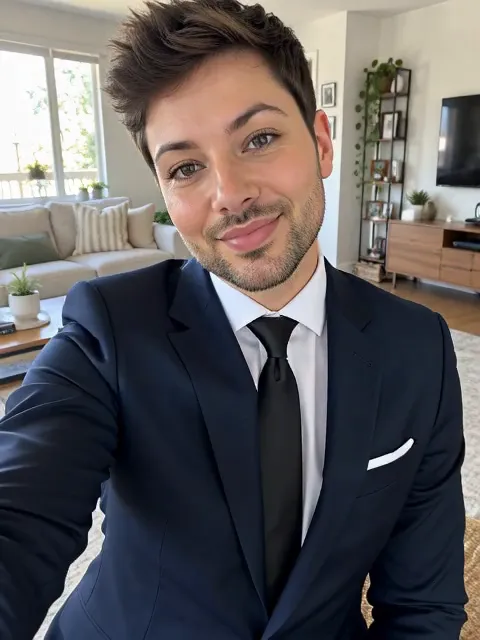
In our own test runs on MiniMax H3, a take with "short textured haircut, light stubble, a tailored suit" came out clean: hair first, then stubble, then the suit, with the room and the selfie pose unchanged (the example clip on this page). The middle of the change can look like a short crossfade. Two other takes overshot: one drew the lipstick unevenly and added a moustache nobody asked for, and one with an empty box pushed the outfit further than the photo. Describe the outfit you want and generate again if a take goes too far.
Where a gender swap clip fits
- Trend posts. Join the gender swap trend on TikTok, Reels or Shorts with a smooth transformation instead of a static filter.
- Style experiments. Preview a new haircut, a makeup look or a different wardrobe direction on yourself before you try it for real.
- Costume and character ideas. Plan a cosplay, a stage role or a party look and see it come together in stages.
- Creative shorts. Open a music video, a skit or a reveal with a makeover that keeps the same face.
Prefer to turn a drawing into a real person? Anime to Real Life brings a character illustration into live action. Want a different move altogether? Animate Photo moves any picture from your own description.
Price, free tries and fair use
You can try it free once a day: without logging in you get one daily clip from the starter model, mute and stamped with our mark. Signing up hands you 30 credits for the first month, which is two 5-second clips, and drips in 5 more credits daily. Buy a plan or credit pack for clean files without the mark.
Upload only photos of yourself or of adults who agreed to it, never minors, celebrities or strangers. This is a creative styling effect: it does not judge or define anyone's gender identity, and it should not be used to mock, out, harass or misrepresent anyone. Label the clip as AI-made when you share it.
Gender swap video FAQ
Does this decide or show someone's gender?
No. It only changes outward styling, such as hair, makeup, grooming and clothes, as a visual effect. It does not judge, predict or define anyone's gender identity.
Will the person still look like themselves?
That is the aim. The instructions keep the face shape, features, skin tone, age impression, pose, camera and background, and change only the styling. The new look is the model's interpretation, so small details shift between takes. Generate again if a take drifts.
Can I choose the direction of the makeover?
Yes. Write the look you want in the optional box, for example "short haircut, light stubble, a suit" or "long hair, soft makeup, a dress", or something in between. Empty means a styling opposite to the one in the photo.
Should I pick 5 or 10 seconds?
Five seconds is a quick try for 15 credits. Ten seconds costs 30 and gives each stage of the change more time, so the makeover looks slower and smoother.
More ways to animate a photo
AI Hairstyle Changer
Try a new haircut or hair color on your own photo: buzz cut, bob, curls, blonde or bald. Your face stays the same. Free account to start, price shown first.
Anime to Real Life
Upload an anime or original character illustration and get a short cinematic clip of the same character as a real person, with hair, outfit and colors kept.
Animate Photos with AI and Make Pictures Move
Animate a photo with AI: add natural motion, blinking, hair and camera movement to any picture, then download a short video. Free credits to try.
Image to Video AI
Turn any photo into a short AI video. Upload an image, describe the motion and pick a model, from Kling and Veo to Grok Imagine and Vidu. Start free with 30 credits.
One photo, one smooth makeover
Pick a clear portrait and watch the look change step by step.