
One illustration · 5 or 10 s · From drawing to live action
Anime to Real Life: Turn a Character Illustration into a Live-Action Clip
Upload a clear picture of an anime character or your own original character, and the AI turns it into a short clip that looks like a scene from a live-action film. The drawing gradually becomes a real person with natural skin, real hair and real fabric, lit like a movie shot, while the hairstyle, outfit, colors and pose stay true to the design you started with.
Use a character you drew, commissioned or have the rights to share.
Free video, one a day without an account · Seedance 1.0 Pro Fast · 480p · 5s
1 left today
 Still
MiniMax H315 credits
 Still
MiniMax H315 credits
 Still
MiniMax H315 credits
 MiniMax H3
How to turn an anime character into a real person
Upload one clear character illustration
Pick a sharp picture of a single character with the face and outfit fully visible. Clean line art or a finished color illustration works best. Speech bubbles, text, heavy effects or a crowd of characters leave the model unsure who to bring to life. The clip opens on your picture, so crop it the way you want the shot framed.
Set the scene if you want
Turning the drawing into live action is built in. The optional box tells the model where the real version stands and what the mood is: "a rainy Tokyo street at night", "a sunny school rooftop", "a misty forest at dawn". Leave it empty and the model picks a real place and lighting that match your illustration.
Generate, check and download
MiniMax H3 renders a 480p clip: 5 seconds for 15 credits or 10 seconds for 30. Ten seconds gives the change more time and leaves a longer stretch of the live-action character moving. The button shows the exact credits before you start, and a failed render refunds them. Switch model or resolution in the menu for a sharper file.
What the live-action version asks the model for
The built-in instructions describe one continuous shot and ask the model to keep your character's design while it changes the look from drawn to real.
| What we ask for | Why it matters |
|---|---|
| One continuous shot from the illustration to a photorealistic person, with a smooth, gradual change | It reads as the character stepping out of the drawing, not a cut to a stranger |
| Natural skin texture, real hair strands, real fabric and real eyes | The film-like realism the effect is known for |
| Soft, natural cinematic light, shallow depth of field and a matching real background | Each frame looks like a live-action still |
| The same hairstyle, hair and eye color, outfit, accessories and color palette | Fans still recognize the character at a glance |
| The same pose, intended action, age impression and proportions | The real version keeps doing what the drawing was doing |
| Subtle natural motion, a coherent expression, gentle blinking; no talking, no voice | The face stays calm and consistent instead of mouthing words |
| No other person, flicker, speech bubbles, text or logos | A clean shot that is still your character |
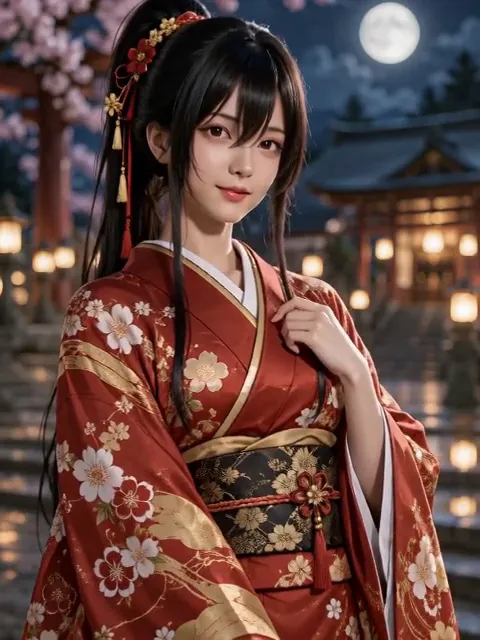
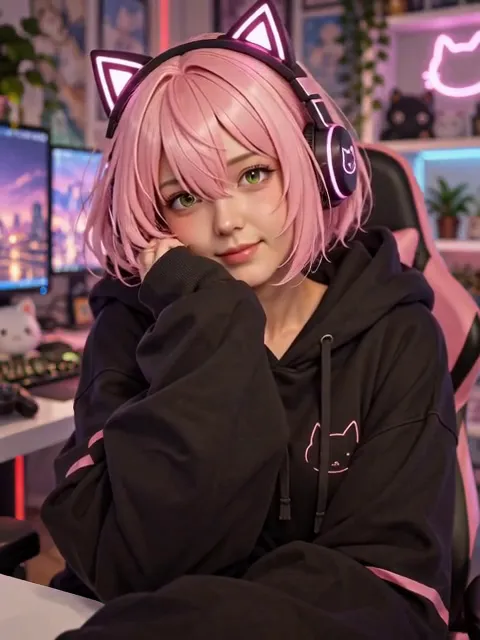
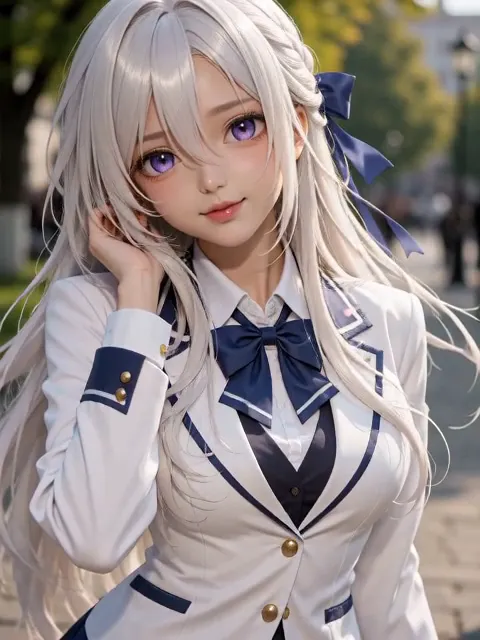
Image-to-video always starts on the uploaded picture, so the clip opens on your illustration and then turns it into live action, rather than starting as a real person. We tried it on three of our own original anime characters: a silver-haired girl in a school blazer, a girl with a black ponytail in a red floral kimono with "a moonlit shrine in Kyoto at night", and a pink-haired gamer in cat-ear headphones with "a cozy gaming room lit by pink neon". In all three the change happened within the first second or two, after which the real version smiled, blinked and moved slightly with its lips closed, keeping the hair, outfit, accessories and pose. The kimono and gamer clips read as live-action footage; the silver-haired girl kept her large violet eyes and came out semi-realistic, closer to a polished 3D render. Small details can shift too: the kimono girl's red eyes turned dark brown. MiniMax H3 adds its own soundtrack, and one of the three had a short sung line in the music, so mute the clip or switch model if you need silence. Very stylized designs, such as huge eyes, unusual eye colors or non-human features, get translated into the closest believable look. If a take drifts from the design, generate again. Want the character to stay drawn and simply move? Try Live 2D Animation.
Where an anime to real life clip fits
- Character concept reels. Show what an original character could look like in a live-action adaptation.
- Fan casting and "what if" posts. Share a clip of a favorite character as a real person for TikTok, Reels or Shorts.
- Creative shorts. Open a short film, a music video or a webcomic trailer with the drawing coming to life.
- Pitch and mood material. Give a script, a game or a cosplay plan a quick live-action reference.
Only need a still photo? Make AI Photo Realistic turns a picture into a lifelike image. Want a different move altogether? Animate Photo moves any picture from your own description.
Price, free tries and fair use
You can try it free once a day: without logging in you get one daily clip from the starter model, mute and stamped with our mark. Signing up hands you 30 credits for the first month, which is two 5-second clips, and drips in 5 more credits daily. Buy a plan or credit pack for clean files without the mark.
Use characters you created, commissioned or have the rights to share, and respect the creators of the series you love when you post fan art. Do not upload real people's photos to pass them off as someone else, and do not use the clip to imply that an official live-action version exists.
Anime to real life FAQ
Does the video start as a real person?
No. Image-to-video always opens on the picture you upload, so the clip starts on your illustration and then turns the character into a live-action version during the shot.
Will it look exactly like my character?
It aims to. The instructions keep the hairstyle, hair and eye color, outfit, accessories, colors and pose. The face itself is the model's interpretation of the drawing, so it looks like a real person who could play the character, not a pixel copy. Generate again if a take drifts.
What kind of illustration works best?
One character, face and outfit fully visible, in a clear finished illustration. Busy group art, tiny figures, text, speech bubbles and heavy glow effects give the model less to work with.
Should I pick 5 or 10 seconds?
Five seconds is a quick try for 15 credits. Ten seconds costs 30 and gives the change from drawing to real more room, plus a longer stretch of the real character moving afterwards.
More ways to animate a photo
Gender Swap Video
Upload a clear photo of yourself and get a short clip where hair, makeup, grooming and outfit shift step by step to another style, with your face, pose and background kept.
Make AI Photo Realistic
Make an AI photo look real: remove plastic skin, glow and oversaturated color, and turn illustrations or 3D renders into real photos. Same subject and layout. Free account to start.
Animate Photos with AI and Make Pictures Move
Animate a photo with AI: add natural motion, blinking, hair and camera movement to any picture, then download a short video. Free credits to try.
Image to Video AI
Turn any photo into a short AI video. Upload an image, describe the motion and pick a model, from Kling and Veo to Grok Imagine and Vidu. Start free with 30 credits.
One illustration, one live-action scene
Pick your favorite character art and see it step out of the drawing.