
One image · 5 s loop · Phone or desktop
Animated Wallpaper Maker: Turn a Still Image into a Looping Live Wallpaper
Upload a photo, a painting or a piece of AI art and say what should move: rain on the glass, clouds drifting over the mountains, stars twinkling above a city. The AI adds soft, slow motion and keeps everything else as it is, so your image becomes a five-second clip that loops on your lock screen or desktop.
Use an image you made or have the rights to.
Free video, one a day without an account · Seedance 1.0 Pro Fast · 480p · 5s
1 left today
 Still
MiniMax H315 credits
 Still
MiniMax H315 credits
 Still
MiniMax H315 credits
 Still
MiniMax H315 credits
 MiniMax H3
How to make an animated wallpaper
Upload the image in the shape of your screen
Pick a sharp image already cropped the way you want it: tall (9:16) for a phone, wide (16:9) for a desktop or laptop. The video keeps the shape of the image you upload, so crop first and the wallpaper fits without black bars.
Describe the motion
Write what should move, in a few words: gentle rain, drifting clouds, rippling water, falling snow, flickering candlelight, hair moving in the breeze. Leave it empty and the AI picks soft ambient motion that suits the scene. One or two kinds of motion look calmer than five.
Generate, preview and download
Out of the box, MiniMax H3 renders a five-second take at 480p for 15 credits. The button shows the exact credits before you start, and a failed render refunds them. Watch the preview on loop, then download the MP4. For a sharper file on a large screen, pick another model or a higher resolution in the menu.
What the wallpaper effect asks the model for
A good live wallpaper is one you stop noticing: it moves, but it doesn't flash, jump or change your picture. The built-in instructions ask for exactly that.
| What we ask for | Why it matters |
|---|---|
| Soft, slow ambient motion only | Calm movement you can look at all day, not an action scene |
| Same subject, composition, colors and art style | It is still your image, just alive |
| No new objects, people, text or logos | Nothing pops into the frame that wasn't in the picture |
| No flicker, flashing or sudden brightness changes | Easy on the eyes on a lock screen, especially at night |
| Camera locked, last frame close to the first | The clip can repeat without a visible jump |
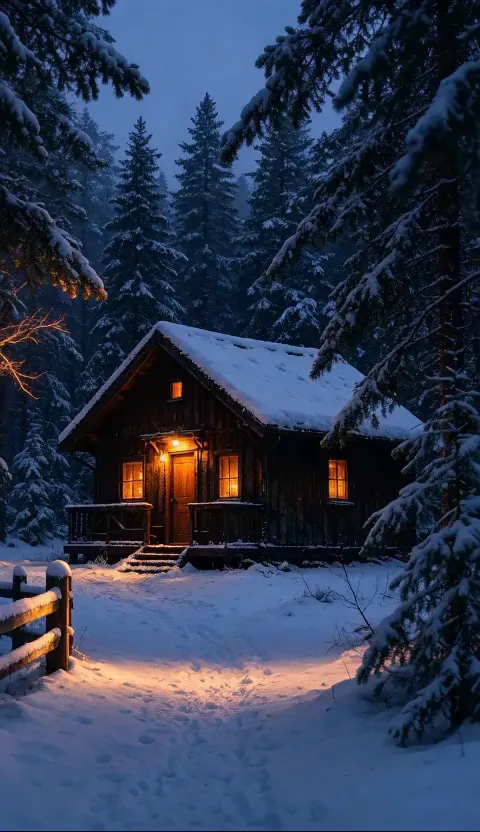
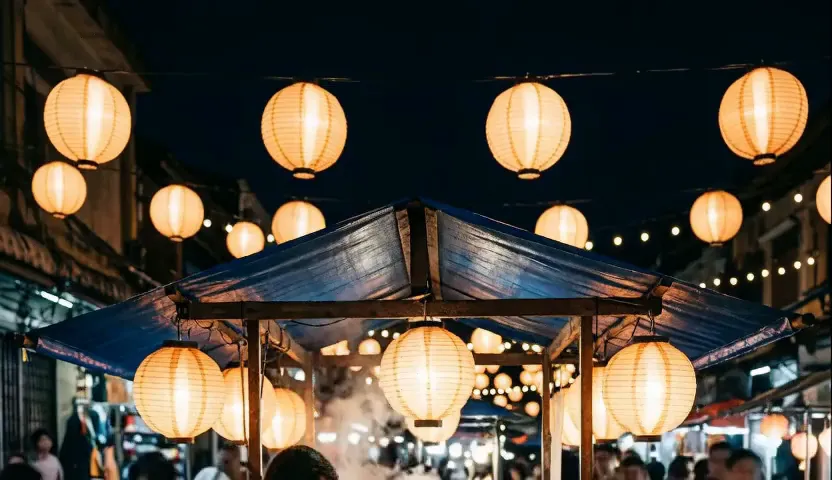
We ran four of our own images through it: a snowy cabin and a beach as tall phone wallpapers, a paper boat and a lantern market as wide desktop ones. All four kept the subject, layout and art style, with no new objects and no flicker. The cabin, where only snow and light move, loops almost without a seam; on the beach the rolling waves leave a visible jump where the clip restarts, and the lantern take drifted slightly closer. Scenes with something that naturally moves work best: sky, water, weather, fire, light, foliage, hair or fabric. To bring a portrait or a family photo to life with a freer, more cinematic motion, use Animate Photo instead.
Where an animated wallpaper fits
- Phone lock and home screens. Set the MP4 with a video or live wallpaper app on Android, or turn it into a Live Photo for iPhone.
- Desktop and laptop backgrounds. Load it into a video wallpaper app on Windows or macOS for a moving desktop.
- Your own AI art. Give a still illustration from an image generator a quiet second life.
- Streams and screens. Use the loop as a stream background, a waiting screen or a café display.
- Sharing. Post the loop as a Reel, a Story or a short, or send it to a friend as a wallpaper gift.
Looking for more motion ideas or ready-made prompts? Browse the video templates.
Price, free tries and fair use
You can try it free once a day: without logging in you get one daily clip from the starter model, mute and stamped with our mark. Signing up hands you 30 credits for the first month, which is two wallpapers, and drips in 5 more credits daily. Buy a plan or credit pack for clean files without the mark.
Use images you created or have the rights to, and leave out photos of other people unless they agreed.
Animated wallpaper FAQ
Which image makes the best animated wallpaper?
A sharp image with a clear subject and something that could move around it: sky, water, weather, light or foliage. Busy collages and images with lots of small text are harder to animate cleanly. Crop it to your screen shape before you upload.
Will the AI change my picture?
The built-in instructions tell the model to keep the subject, composition, colors and art style the same and to add no new objects or text. Motion can still soften fine details at 480p; if a take drifts, generate again, and remember each run is charged.
Does it loop seamlessly?
Not perfectly. The model is asked to keep the camera still and end close to the first frame. In our tests a quiet scene with falling snow came back almost to its first frame, while rolling waves left a small visible jump at the restart. Slow, even motion like snow, mist, drifting clouds or lights hides the seam best. Preview the loop before you set it as your wallpaper, and generate again if the jump bothers you.
Can I use it on an iPhone or Android phone?
Yes. You download a standard MP4. Android phones and video wallpaper apps take it directly; on iPhone, convert it to a Live Photo with a converter app and set it from the Photos app.
More ways to animate a photo
Animate Photos with AI and Make Pictures Move
Animate a photo with AI: add natural motion, blinking, hair and camera movement to any picture, then download a short video. Free credits to try.
Credits Video Maker
Type your title, cast, crew, music and thanks, preview the rolling credits or end card, and export a video for free. Every name is shown exactly as typed.
Motion Mimic
Upload a photo of a person or character, describe the moves to copy, and get a video of them dancing, walking or posing on the beat. Same face and outfit. Try it free.
Image to Video AI
Turn any photo into a short AI video. Upload an image, describe the motion and pick a model, from Kling and Veo to Grok Imagine and Vidu. Start free with 30 credits.
Bring your wallpaper to life
Choose an image, say what should move, and get a calm loop for your screen.