
One photo · 5 s · Solo portrait or couple
Kiss Me AI: A Gentle Kiss Video from One Portrait or Couple Photo
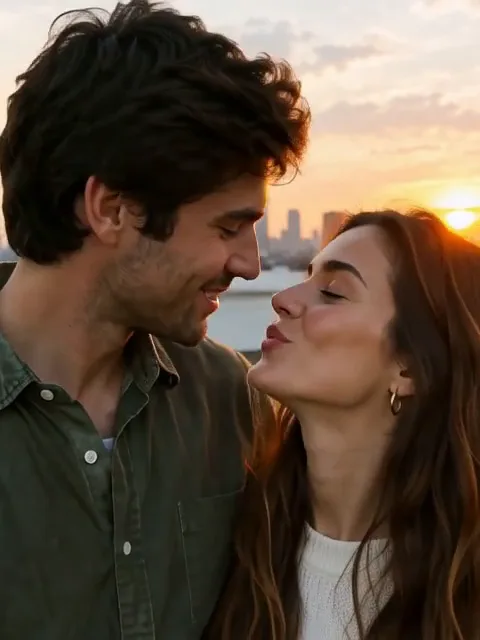
Upload a portrait of yourself, or a close photo of you and your partner, and the AI turns it into a short, tender kiss moment. On a solo portrait, the person looks into the camera, blinks softly, tilts the head a little and leans in to blow a gentle kiss, then smiles. On a couple photo, the two turn toward each other and share one brief, quiet kiss. Faces, skin tones and the background stay the same, and the motion stays subtle rather than dramatic.
Only use your own photo, or a photo of adults who agreed to be in a kiss video.
Free video, one a day without an account · Seedance 1.0 Pro Fast · 480p · 5s
1 left today
 Still
MiniMax H315 credits
 MiniMax H3
How to make a kiss me video with AI
Upload one clear photo
Use a sharp portrait of one person facing the camera, or a close photo of two adults with both faces fully visible. Only use your own photo or one of adults who agreed to it. Good light and a head-and-shoulders crop give the model the most detail around the eyes and lips.
Add a mood if you like
The kiss, the blink and the head movement are built in. Extra details can set the mood, for example warm sunset light, string lights in the background or snow falling softly.
Generate and share
Out of the box, MiniMax H3 renders a five-second take at 480p for 15 credits. The button shows the exact credits before you start, and a failed render refunds them. Pick another model in the menu for a sharper or longer file.
What the Kiss Me AI effect asks the model for
The built-in instructions describe a calm, romantic moment and list what must not change.
| What we ask for | Why it matters |
|---|---|
| Solo portrait: a soft look, a blink, a slight lean and a gentle kiss toward the camera | One photo of you is enough for a sweet kiss-to-camera clip |
| Couple photo: the two turn toward each other for one brief, gentle kiss and a smile | The moment feels tender instead of staged |
| Slow, small movements of the lips, eyes and head | Subtle motion looks natural and keeps faces stable |
| Each face stays separate and never blends into the other | Face merging is a common failure in AI kiss videos, so we rule it out directly |
| Lips, teeth and mouth without warping or stretching | The mouth is where AI faces most often break |
| Same identity, skin tone, features, hair, outfit and background, no talking | The clip still looks like your photo, just alive for a few seconds |
Video models find two faces meeting hard, which is why the motion is kept short and gentle. For a fuller couple kiss, try the AI kissing video generator, and for a warm embrace, try the AI hug video.
Where a kiss me clip fits
- Anniversaries and Valentine's Day. Send your partner a few seconds of a favorite photo coming to life.
- Long-distance messages. Blow a kiss from your own portrait when you cannot be there.
- Romantic social posts. Open a Reels, TikTok or Shorts post with a soft, personal moment.
- Wedding and engagement memories. Add gentle motion to a couple portrait for a slideshow or story.
- Creative romance edits. Use the clip as a short intro or ending in your own video.
Want a different move, such as a playful face? The AI tongue out effect turns a selfie into a cheeky reaction.
Price, free tries and fair use
You can try it free once a day: without logging in you get one daily clip from the starter model, mute and stamped with our mark. Signing up hands you 30 credits for the first month, which is two full kiss clips, and drips in 5 more credits daily. Buy a plan or credit pack for clean files you can use in sponsored or brand posts.
Only use photos of yourself, or of adults who clearly agreed to appear in a kiss video. Do not upload minors, celebrities or strangers, do not pair people who are not a couple, and do not use the clip to embarrass, deceive or harass anyone.
Kiss Me AI FAQ
Can I use a photo of just one person?
You can upload one, and the person is asked to look into the camera, blink, lean in and blow a soft kiss toward the viewer. To be honest about our tests: in two solo runs the kiss to camera came out well, but after about two and a half seconds the model both times added a second copy of the same woman, even after we told it more firmly to keep one person in the shot. For now a couple photo gives far more reliable results; if a solo take adds anyone, generate again or cut the clip before it happens, and remember each run is charged.
Will the faces merge or the mouth look strange?
The built-in instructions ask the model to keep each face separate, keep the lips, teeth and mouth natural, and keep the movement small, because two faces meeting is the hardest part for video models. The example on this page comes from a couple photo: the two smiled at each other, shared one brief kiss and parted, and both faces stayed separate and unchanged. A clear, well-lit photo where both faces are fully visible helps the most. If a take looks wrong, generate again, and remember each run is charged.
Will my face or skin tone change?
The instructions ask for the same identity, skin tone, face shape, features, hairstyle, outfit and background. A sharp, high-resolution photo gives the model the most to hold on to.
Does the clip have sound?
The instructions ask for no talking and no voice. MiniMax H3 always adds its own sound track, though, which can include background sound or a short noise. Use the clip muted, or pick a model without sound in the menu.
Whose photos can I use?
Your own, or photos of adults who agreed to appear in a kiss video. Never upload minors, and never use someone else's photo without permission.
More ways to animate a photo
AI Kissing Video Generator
Kissing AI that turns one photo of you both into a short kiss clip with sound. Try it free online each day and see the credit cost before you generate.
AI Tongue Out
Upload a clear selfie and get a short, playful tongue-out reaction clip with natural lip and jaw motion, a wink and a head tilt. Same face. Try it free.
Animate Photos with AI and Make Pictures Move
Animate a photo with AI: add natural motion, blinking, hair and camera movement to any picture, then download a short video. Free credits to try.
Image to Video AI
Turn any photo into a short AI video. Upload an image, describe the motion and pick a model, from Kling and Veo to Grok Imagine and Vidu. Start free with 30 credits.
One photo, one gentle kiss
Pick a portrait or a couple photo and watch it come to life with a soft kiss and a smile.